Best Printer Buying Guide — Black Friday Deals 2026
A printer is easiest to choose when you start with the work it needs to do: color pages and occasional scanning, steady home printing with refillable ink, or fast monochrome document handling. These three options cover different routines, so the right Black Friday choice depends less on a headline offer than on whether the printer’s features match yours. Before comparing offers, decide whether color matters, how often you expect to print, and whether you need an automatic document feeder or automatic two-sided printing. Then check the exact model and configuration shown in the Black Friday listing. The HP DeskJet 2923, Epson EcoTank ET-2900, and Brother DCP-L2640DW each make sense for a different set of priorities.
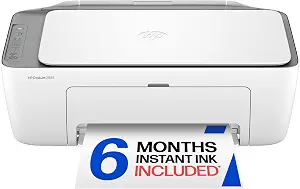
HP DeskJet 2923 Color Inkjet Printer (ASIN B0GMW9XT9X)
Best Budget: HP DeskJet 2923 Color Inkjet Printer. Choose this model if your routine calls for color printing, copying, and scanning in one printer, with mobile and wireless printing available. Its 60-sheet input tray is a practical consideration for lighter, intermittent printing: think through how often you will replenish paper instead of assuming a tray size is irrelevant. Print speed is up to 7.5 ppm black and 5.5 ppm color, so compare those figures with the pace your regular jobs require.
The DeskJet offers Apple AirPrint, USB, Wi-Fi, wireless direct printing, and Mopria. That mix gives you several listed connection methods to consider when matching the printer to the devices and setup you already use. Two-sided printing is manual, with driver support provided, so plan to turn pages yourself if you regularly print on both sides. Maximum color print resolution is up to 4800 x 1200 optimized dpi under the stated conditions: printing from a computer on selected HP photo papers and with 1200 input dpi. Keep those qualifications in mind when comparing resolution claims.
The HP is the Best Budget selection in this group as an editorial recommendation for shoppers prioritizing a straightforward color all-in-one feature set. It is not a statement about a particular price or discount. During Black Friday, check that the offer is specifically for the DeskJet 2923 and review what the listing says is included before comparing it with an offer for another printer. Its dimensions are 11.97″D x 16.73″W x 6.06″H, which you can compare directly with the space you plan to use. This model may suit occasional home printing and scanning; if you need a larger tray, a refillable tank approach, or fast monochrome document handling, the Epson and Brother offer different priorities to weigh.
Key specs
Functions
Color print, copy, scan, and a 60-sheet input tray, plus mobile and wireless printing
Print speed
Up to 7.5 ppm black, 5.5 ppm color
Connectivity
Apple AirPrint; USB; Wireless (Wi-Fi); Wireless direct printing; Mopria
Duplex
Manual (driver support provided)
Maximum color print resolution
Up to 4800 x 1200 optimized dpi color (when printing from a computer on selected HP photo papers and 1200 input dpi)
Dimensions
11.97″D x 16.73″W x 6.06″H
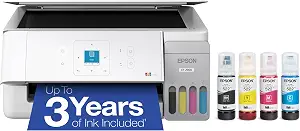
Epson EcoTank ET-2900 Wireless All-in-One Color Supertank Printer
Epson EcoTank ET-2900 Wireless All-in-One Color Supertank Printer (ASIN B0GSSGLV8D)
Best Overall: Epson EcoTank ET-2900 Wireless All-in-One Color Supertank Printer. This is a sensible all-around pick when you want color printing, scanning, and an ink supply designed around refillable tanks. Its included ink is stated to last up to 3 years, with a yield of up to 3,600 pages black and 6,500 color. Those figures give shoppers a useful starting point for considering a larger print routine, though your actual needs depend on what and how often you print. Supersized tanks and uniquely keyed EcoFit bottles are intended to make refilling straightforward.
The ET-2900’s 100-sheet paper tray and high-resolution flatbed scanner suit a household that alternates between printing pages and scanning individual documents. Wi-Fi supports wireless placement and printing, while the 1.44-inch color display gives you a small on-printer screen. The listed print speed is 11 black/6 color ISO ppm. Consider that specification alongside your own mix of color and black pages rather than treating speed alone as a measure of fit.
For a Black Friday purchase, the EcoTank’s included ink yield is a particularly useful detail to check in the exact offer. Confirm that the listing identifies the ET-2900 and the included-ink configuration you expect; do not assume another listing or variant has the same contents. This is the Best Overall choice among these three because it combines color all-in-one functions, a refillable tank system, a flatbed scanner, and a 100-sheet tray. That label is an editorial fit for a broad mix of home tasks, not a claim that it outperforms every printer or suits every workload. If you mostly print monochrome documents at speed, or want the lowest initial setup complexity, compare the other options before deciding.
Key specs
Ink supply
Epson EcoTank includes enough ink to last up to 3 years
Included ink yield
WORRY-FREE PRINTING — Epson EcoTank comes with enough ink to print up to 3,600 pages black/6,500 color
Ink refill system
Supersized ink tanks and uniquely keyed EcoFit bottles make refilling ink simple
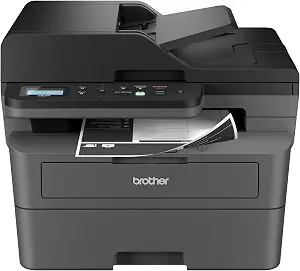
Best for Fast Document Workflows: Brother DCP-L2640DW Wireless Compact Monochrome Multi-Function Printer. Its listed print speed of up to 36 ppm makes it the option to examine first if your regular queue is made up of monochrome documents and a quick output pace is important to you. It is a monochrome multifunction printer, so consider whether color printing is a requirement before choosing it. The 50-page auto document feeder can help when you need to process a stack of pages for scanning or copying, rather than placing each page individually on a scanner.
This Brother supports automatic duplexing, which matters if you commonly produce two-sided documents and prefer not to turn pages manually. Its built-in dual-band wireless supports 2.4GHz / 5GHz, and Ethernet is also listed as a wired connection. Maximum media size is 8.5 x 14 inch. Compatible toner is listed as TN830 and TN830XL, so those model numbers are worth checking when you compare the ongoing supply options available to you.
For a Black Friday comparison, verify the DCP-L2640DW model and its listed toner compatibility in the exact offer. Avoid assuming that an offer for another Brother printer has the same feeder, duplexing, connections, or compatible toner. This is the Best for Fast Document Workflows choice because its provided details align with document-heavy use: up to 36 ppm, an auto document feeder, and automatic duplexing. The label describes a useful match among these featured products, not a measured ranking or a guarantee of speed in every situation. If color output is central to your routine, compare the HP and Epson instead; if you want an included ink yield stated for both black and color pages, look closely at the EcoTank.
Key specs
Print speed
print speeds up to 36 ppm(2)
Document feeder
A 50-page auto document feeder(4)
Wireless
built-in dual-band wireless (2.4GHz / 5GHz)
Wired connections
Ethernet
Duplex
Auto-Duplex
Maximum media size
8.5 x 14 inch
Compatible toner
TN830, TN830XL
Sort your routine into color, mixed, or monochrome work
Start by identifying the kinds of pages you expect to print repeatedly. If color pages, copying, and scanning all belong in the same home routine, both the HP DeskJet 2923 and Epson EcoTank ET-2900 list color printing and all-in-one functions. Their ink approaches differ: the HP is a color inkjet, while the Epson uses supersized tanks with keyed EcoFit bottles and includes ink stated to last up to 3 years. Those are practical distinctions to consider, not a promise that one will suit every print volume.
If your typical work is monochrome documentation, the Brother DCP-L2640DW is the dedicated option to assess. Its up to 36 ppm listed speed, auto document feeder, and automatic duplexing speak to a different workflow than the color models. Ask whether color is essential or merely an occasional convenience before you focus on a Black Friday headline. Also consider the whole task: copying or scanning, feeding a group of pages, and producing two-sided output can matter just as much as the print job itself. Match those needs to the model’s listed features, then compare offers for that exact printer.
Work out what the ink or toner setup means for you
Supplies are part of the ownership decision, so look beyond the printer’s name when comparing configurations. The Epson listing states that its included ink can print up to 3,600 pages black and 6,500 color, and says the supply can last up to 3 years. Treat these as stated maximums and consider your own likely mix of pages; a household that prints infrequently may weigh the setup differently from one that expects to print regularly. Its refillable tank design and keyed bottles are useful details to check against your comfort with refilling.
The HP listing describes a color inkjet but does not provide an ink yield in these details. Do not fill that gap with assumptions: check the exact offer and the product information available for the configuration you are considering. For the monochrome Brother, compatible toner models are TN830 and TN830XL. Compare Black Friday offers by confirming the printer model and looking at which supplies are identified, rather than assuming that a promotion includes extras. Decide what you need to know about replacement supplies before checkout; the offer should make the actual configuration clear enough for an informed choice.
Think beyond speed when pages need handling
A speed figure describes one part of printing, not the entire trip from a document to a finished stack. The HP lists up to 7.5 ppm black and 5.5 ppm color, while the Epson lists 11 black/6 color ISO ppm. The Brother lists up to 36 ppm. These figures use different descriptions, so avoid treating them as a direct, like-for-like test. Instead, ask whether your work is mostly occasional color pages, mixed home printing, or larger monochrome document jobs.
Paper handling can change the practical fit. The Epson has a 100-sheet tray, and the HP has a 60-sheet input tray. The Brother includes a 50-page auto document feeder and automatic duplexing, while the HP’s duplexing is manual with driver support provided. If you scan or copy a group of pages, check whether the feeder suits that task; if you print two-sided pages, make a deliberate note of which models list automatic versus manual duplexing. During Black Friday, compare these workflow details as carefully as the speed shown in the offer. A feature that removes a repeated step may be more relevant to your routine than a headline number.
Check the connection and the space you can give it
Before choosing a printer, decide how it will connect in the place you intend to use it. The HP lists Wi-Fi, USB, wireless direct printing, Apple AirPrint, and Mopria. The Epson lists Wi-Fi. The Brother lists built-in dual-band wireless at 2.4GHz / 5GHz as well as Ethernet. Match those stated options to your preferred setup, and verify the connection you plan to use rather than assuming that every printer supports the same method.
Placement deserves its own check. The HP’s listed dimensions are 11.97″D x 16.73″W x 6.06″H. Compare that exact formatting with the available space and consider the area you need to access the printer for normal use. Dimensions are not supplied here for the other two models, so consult the exact Black Friday listing if physical measurements are important to your decision. Avoid relying on a similar model’s details. The goal is to settle connection and placement questions before a tempting offer distracts you from whether the printer can be set up where you need it.
Read the Black Friday listing as a model-specific offer
Once you know which features matter, use Black Friday to compare specific offers rather than general product names. Confirm the full model name: DeskJet 2923, EcoTank ET-2900, or DCP-L2640DW. Then inspect the configuration information shown for that offer, particularly the included ink or toner details if they are stated. Do not infer that two listings share the same contents just because their product names look similar, and do not assume a discount or accessory that the listing does not identify.
Next, check whether the model’s key features align with your original shortlist. For the Epson, that may mean the stated ink yield, tank refill system, Wi-Fi, and 100-sheet tray. For the HP, it may be the color all-in-one functions, connection choices, or manual duplexing. For the Brother, it may be the auto document feeder, automatic duplexing, Ethernet, and toner compatibility. Black Friday can make many offers appear comparable, but your decision should turn on the exact printer and configuration presented. If a detail matters and is unclear, seek clarification in the offer information before purchasing rather than filling in the blank yourself.
Make your Black Friday choice
Choose the printer that fits your repeated tasks, not the one with the most appealing headline. The Epson EcoTank ET-2900 is the broad all-in-one pick here, with color functions, a flatbed scanner, and a stated included-ink yield. The HP DeskJet 2923 makes sense if you want color printing, copying, scanning, and several listed connection methods in a compactly specified footprint. The Brother DCP-L2640DW is tailored to monochrome document workflows with its feeder and automatic duplexing. For Black Friday, confirm the exact model and offer configuration, then compare the features and supplies that matter to you. That final check is more useful than assuming every listing presents the same purchase.