Best Mini Pc Buying Guide — Black Friday Deals 2026
A mini PC can simplify a desk setup, but the right choice depends on the work it needs to cover, the connections already in use and how much local storage makes sense. This shortlist spans a compact Bmax configuration, the BOSGAME E5 11 Pro and the GEEKOM A7, with different processors, memory and port selections. Treat Black Friday as a reason to compare the exact listed configuration, not as proof that a particular offer is worthwhile. Check the product name and specifications on the offer itself, then weigh the system against your own setup. The recommendations below are editorial matches to specific needs, not claims of market-wide superiority.
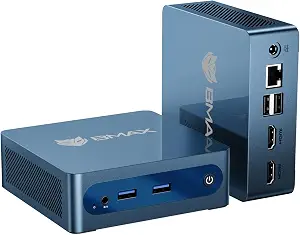
Best Budget: The Bmax Mini PC B1 Plus is the most straightforward option here for a shopper who wants to keep the configuration and desk footprint in view. Its Intel Celeron J3355 processor is listed at up to 2.5GHz, paired with 6GB RAM and 128GB eMMC. Those details make it important to compare the system with your actual routine rather than assume a compact computer will suit every workload. If your plan is a simpler desktop setup and the listed memory and storage fit your needs, this model deserves a place on a Black Friday shortlist. The Best Budget label reflects its role among these three options, not a measured performance or price finding.
The B1 Plus has dual HDMI ports, a useful detail for shoppers whose display arrangement calls for those connections. Wireless specifications list dual-band WiFi5 (2.4G/5G) and Bluetooth 5.0. Its dimensions are 4.25 x 4.13 x 1.42 inches, so you can compare that exact footprint with the intended spot before buying. Linux/Ubuntu support is also listed; if you plan to use one of those operating systems, confirm that the offer is the B1 Plus configuration with that support rather than relying on a general mini PC description.
For Black Friday, scrutinize the exact variant and its stated 6GB RAM and 128GB eMMC instead of comparing headlines alone. Decide how much storage you expect to use locally, and whether your display and wireless needs match the listed connections. The provided specifications do not establish how the system will handle a particular application, so use your own software requirements as a filter. This model makes most sense when its modest, clearly stated configuration and compact dimensions align with your priorities; if you need a different processor or more listed storage, compare the other options before checking out.
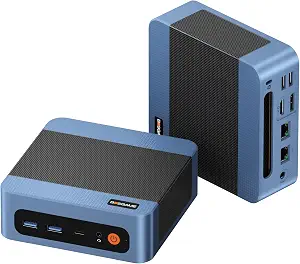
Best Overall: The BOSGAME E5 11 Pro is a balanced candidate for shoppers who want a more capable-looking specification mix without choosing the GEEKOM’s larger listed memory and storage configuration. It uses an AMD Ryzen 3 5300U processor with 4 cores and 8 threads, boost up to 3.8GHz and 6MB total cache. The system pairs it with 8GB DDR4 dual-channel memory and a 256GB M.2 2280 SSD. These are useful points of comparison when narrowing a shortlist around the applications and file needs you already have. Best Overall is an editorial fit among the featured systems, not a claim that it wins every use case.
Its video connections are 1x HDMI 2.0 port, 1x DisplayPort and 1x Full-Function Type-C port. Check those against the cables and displays you intend to connect rather than assuming a port name guarantees a particular setup. For wired networking, the machine lists dual 2.5 Gigabit Ethernet ports. Storage expansion is another distinguishing detail: an extra empty internal M.2 2280 PCIe 3.0 slot is listed. That can matter to a buyer considering internal expansion, though it does not say what drive to choose or establish that an upgrade is necessary. Windows 11 Pro is the stated operating system.
When Black Friday listings appear, compare the E5 11 Pro’s exact processor, memory, SSD capacity, operating system and port details with the offer. A different bundle or variant should not be treated as identical just because the product family name looks familiar. Consider whether the extra internal M.2 slot is relevant to your plans, and whether the mix of HDMI, DisplayPort, Type-C and wired Ethernet fits your setup. The combination makes this a flexible all-round shortlist choice for shoppers whose needs align with those particulars, but your preferred connections and software should decide whether it is the right one.
Key specs
Processor
AMD Ryzen 3 5300U processor (4 Cores, 8 Threads, up to 3.8GHz boost, 6MB total cache)
Memory and storage
8GB DDR4 dual-channel memory and a fast 256GB M.2 2280 SSD
Storage expansion
an extra empty internal M.2 2280 PCIe 3.0 slot
Video outputs
1x HDMI 2.0 port, 1x DisplayPort, and 1x Full-Function Type-C port
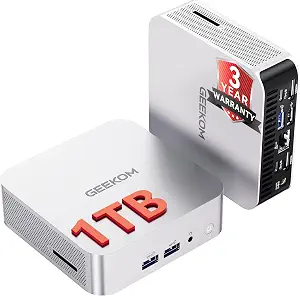
Best for port flexibility: The GEEKOM A7 Mini PC stands out in this group for the range of listed video and high-speed connections. Its AMD Ryzen 5 7535HS processor is paired with 16GB DDR5 memory and a 1TB SSD. That specification set can suit a shopper who values the stated memory and local storage capacity, while the port selection is the key reason to give it a close look. The Best for port flexibility label describes that connection-focused distinction among these products; it does not imply a measured advantage in every task or a guarantee about any particular peripheral.
For video, the A7 lists 1*USB3.2 Gen 2 Type C (4K@120Hz) and 2* HDMI 2.0 (4K@120Hz). It also lists 2*USB4, specified as up to 40Gbps and 8K, plus an SD Card Slot. These details give buyers several concrete points to check against a planned display and accessory layout. Match the exact connector types and qualifications to the equipment you intend to use; do not infer more about a connection than the listed specification says. The processor, memory and storage are likewise best assessed against your software and file requirements.
A Black Friday comparison should confirm that the offer is for the A7 with the stated Ryzen 5 7535HS, 16GB DDR5 and 1TB SSD, and that the port list matches the configuration being sold. Think through which connections you will use before treating a long port list as inherently valuable. If the USB-C video output, HDMI outputs, USB4 ports or card slot address real needs in your setup, that flexibility may justify keeping this model on the shortlist. If they do not, compare the other systems on the specifications that matter more to you.
Key specs
Processor
AMD Ryzen 5 7535HS
Memory
16GB DDR5
Storage
1TB SSD
USB-C video output
1*USB3.2 Gen 2 Type C(4K@120Hz)
HDMI video outputs
2* HDMI 2.0(4K@120Hz)
USB4 ports
2*USB4 (up to 40Gbps,8K)
Card slot
SD Card Slot
Start with the setup you need to support
Before comparing processors, write down what the mini PC must connect to and what you expect it to do. Include the displays you plan to use, any wired network connection, the peripherals that need ports and the operating system you intend to run. This turns a broad search into a practical checklist. For example, the Bmax lists dual HDMI, while the BOSGAME lists HDMI, DisplayPort and a Full-Function Type-C port; the GEEKOM lists USB-C video output and HDMI outputs with stated formats. Those are distinct connection descriptions, not interchangeable promises. Verify the exact port and its qualification against your equipment.
Then separate required features from nice-to-haves. If you specifically want Linux/Ubuntu support, that support is listed for the Bmax; the BOSGAME lists Windows 11 Pro. Do not assume that a detail supplied for one model applies to another. Black Friday listings can draw attention to a product-family name or headline, so open the exact offer and confirm the selected model and configuration. This simple first pass can eliminate a tempting-looking offer that does not match your operating system, display arrangement or wired-network needs.
Compare the whole configuration, not one headline spec
Processor names are only one part of the decision. The shortlist includes an Intel Celeron J3355 in the Bmax, an AMD Ryzen 3 5300U in the BOSGAME and an AMD Ryzen 5 7535HS in the GEEKOM. Memory and storage differ too: the Bmax lists 6GB RAM and 128GB eMMC, the BOSGAME lists 8GB DDR4 and a 256GB M.2 2280 SSD, and the GEEKOM lists 16GB DDR5 and a 1TB SSD. Use these facts to identify the configurations worth investigating, then judge them against the applications and files you actually expect to use.
Avoid treating any single number as a substitute for checking the rest of the listing. A Black Friday page might present a model family while the selected variant has its own configuration; confirm the processor, memory and storage shown for the exact option you can add to cart. Consider whether a listed capacity is enough for your local files and whether the specific memory type or storage format matters to your plans. The provided specifications cannot tell you how a system will behave with software not described here, so make those requirements part of your own comparison rather than assuming a result.
Make display connections a practical checklist
Port lists are easiest to evaluate when mapped to a real desk. Note the connector on each display and any other device you expect to attach, then compare those needs with the ports listed for each PC. The Bmax has dual HDMI ports. The BOSGAME lists 1x HDMI 2.0, 1x DisplayPort and 1x Full-Function Type-C. The GEEKOM lists Type-C video output and HDMI outputs, with resolution and refresh-rate qualifications in its specifications. The GEEKOM also lists USB4 ports with stated speed and resolution qualifications. Keep those details attached to the particular port; do not generalize them to every connection.
This is especially useful during Black Friday, when a long feature list can seem persuasive even if it does not solve your actual connection problem. Check the number and type of outputs you need, and confirm the exact model in the offer. If your setup uses only a particular connector, prioritize finding that connector over collecting ports you will not use. If you are planning a multi-display arrangement, verify the connection requirements for the specific displays and configuration before purchase; the listed port facts alone do not establish every possible arrangement.
Decide how much room files need
Storage planning is not just a capacity comparison. The Bmax lists 128GB eMMC, the BOSGAME lists a 256GB M.2 2280 SSD and an extra empty internal M.2 2280 PCIe 3.0 slot, and the GEEKOM lists a 1TB SSD. Consider whether your files will live on the PC, how much space you want available locally and whether an expansion option is relevant to your plans. The BOSGAME’s empty slot is a specific feature to investigate, not a reason to buy additional storage automatically. Check the offer’s wording if internal expansion is part of your decision.
For Black Friday, compare the capacity and storage description of the selected configuration rather than relying on a product image or a broad family listing. Think about the files you expect to keep locally and what space you want reserved for future use. Do not assume that one storage label indicates a particular day-to-day result; your own file habits are the useful guide. If your needs are unclear, note what you currently store on a computer and use that as a starting point for deciding which listed capacity merits a closer look.
Use the offer page as the final verification step
A seasonal label does not establish that a product has the right configuration or that the offer suits your budget. Compare the exact item name and selected variant with the specifications that led you to shortlist it. Check processor, memory, storage, operating system and the ports you care about. For the Bmax, confirm the Linux/Ubuntu support and listed wireless details if they matter to your choice. For the BOSGAME, verify the stated Windows 11 Pro system and the storage slot if expansion is part of your plan. For the GEEKOM, make sure the offer corresponds to the A7 and the port details you expect.
During Black Friday, keep a short checklist beside the offer: exact model, required configuration, essential connections and acceptable total cost as displayed at checkout. Compare like with like, and do not assume a headline applies to every variant or that a promotion is active simply because the season is mentioned. If a specification is unclear on the offer page, pause and resolve that uncertainty before buying. This last review helps keep the decision tied to useful facts instead of urgency or a broad product-family description.
Make your Black Friday choice
Choose the Bmax when its compact dimensions, dual HDMI and stated configuration suit your priorities; consider the BOSGAME for its processor, wired networking and listed expansion slot; and look to the GEEKOM if its varied port selection matches your setup. These are focused distinctions, not universal rankings. As Black Friday approaches, compare the exact configuration and offer rather than assuming a seasonal label settles the decision. A mini PC is a better fit when its operating system, storage and connections line up with your real routine.