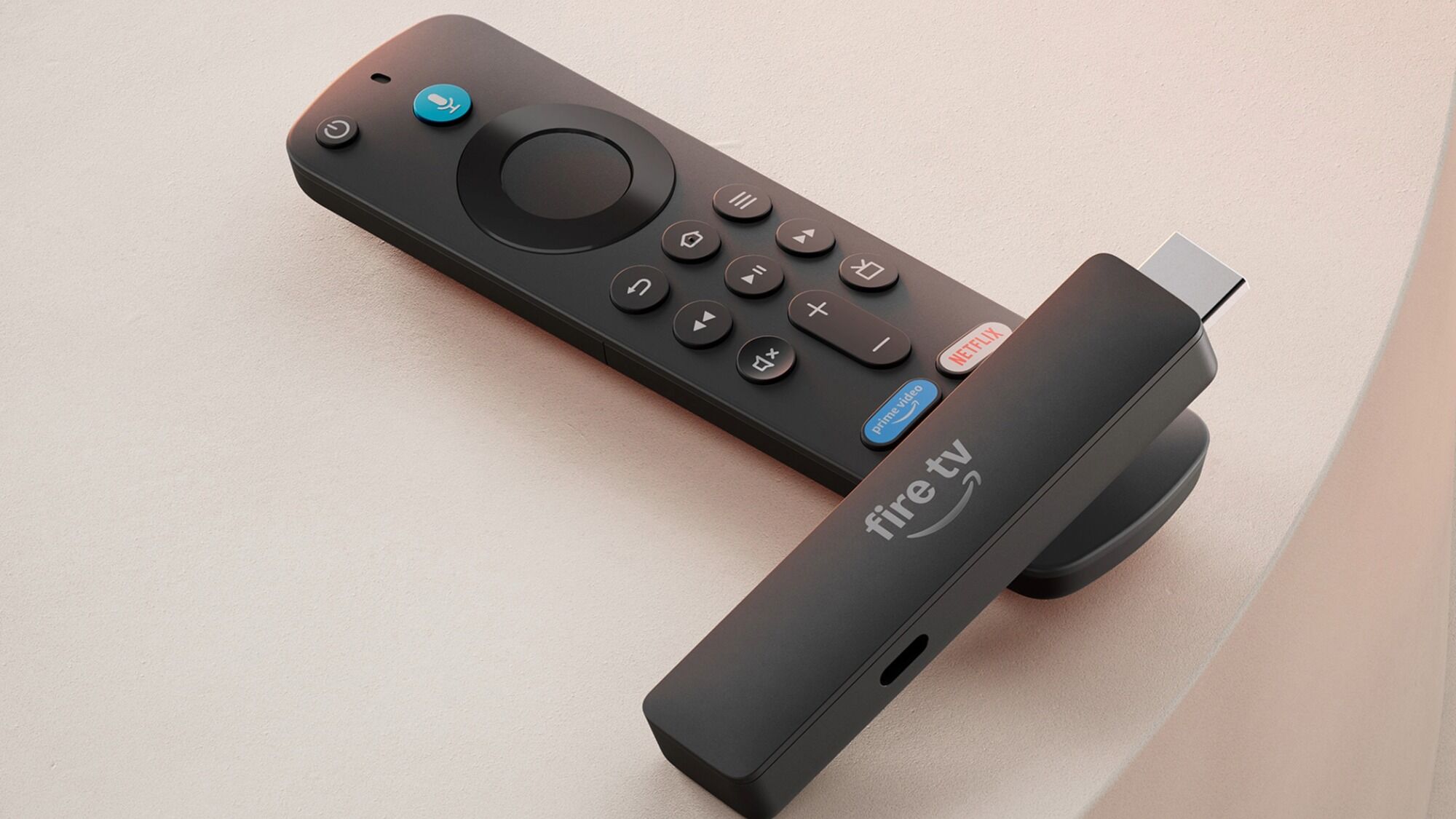
The stick on this page is the Fire TV Stick HD newest model, the slim Direct Power version. It is a Full HD streamer. The listing says the television powers it through the included USB-C cable, and the remote in the set is an Alexa Voice Remote with preset app buttons. The same listing names Wi-Fi 6. It is not a Fire TV Stick 4K, and it is not a Fire TV Stick 4K Max. An earlier HD stick is a different box from this newest model. If a title adds 4K or Max, you have left this product.
Fire TV Stick Black Friday Deals 2026: Read 4K and Max Before You Add It
This HD stick is the one people buy for a 1080p bedroom TV, a guest room, or a kitchen set that has no 4K panel. The newest model is the slim Direct Power body: HDMI on one end, USB-C power on the stick, cable to the TV. A Fire TV Stick 4K is the stick that outputs 4K and HDR formats the TV can accept. A Fire TV Stick 4K Max is the faster, newer-radio version of that 4K idea, with a more capable Wi-Fi generation on the years Amazon has sold it. They share the Alexa remote shape and the Fire TV home screen. They do not share the same picture path. A Black Friday grid loves to show three sticks in a row with the price in the largest type and the word Max in the smallest.
The TV decides which stick is rational. A 1080p set does not become a 4K set because the stick says 4K. You will get a nice interface and a signal the TV scales. A 4K set fed by an HD stick will play HD streams even when the app offers 4K. Match the stick to the panel, and match it to the HDMI port that actually works. Some TVs have an HDMI port that fails, or a port shared with a soundbar in a way that blocks the stick. The stick needs a powered HDMI port or the USB power cable in the box. A TV that cannot feed the stick enough power will reboot it. Use the included cable and a wall adapter if the TV port is weak.
The remote in the box matters more than people think. Newer Fire TV remotes add a television-control set, a mic for Alexa, and sometimes a finder button. An older refurbished stick can ship with a remote that does not control your TV’s volume. That is still a working streamer. It is a worse daily remote. Read the remote photo. A “refurbished” or “renewed” word on a stick should be treated as condition, the same way it is on a phone. A stick has less to wear out than a phone, and a tired remote battery door still matters.
Wi-Fi is the other split. This HD listing names Wi-Fi 6. That radio belongs to this stick, not automatically to a 4K or Max stick in the next row. A Max-class stick from recent years is the one people buy when they want a different, higher picture path and a different radio story. Read that title on its own. Do not copy Wi-Fi 6 onto it. Placement of the stick behind a thick TV can hurt any radio. An HDMI extender, the short cable in many Fire TV boxes, exists so the stick can sit beside the TV instead of in a shielded well.
Apps, Live TV, and the Ethernet Adapter Question
Fire TV runs Amazon’s interface. Netflix, Prime Video, YouTube, Disney+, and the rest of the usual apps are the point. Some apps are not on Fire TV. If your household depends on one specific app, check that store before you care about 4K. A stick that does not have the app you watch is the wrong ecosystem, even at a tempting seasonal price.
Alexa voice search is built in. It finds shows across some apps and misses others. It is convenient and it is not a universal search of every service you pay for. Profiles on Fire TV are how a family keeps recommendations apart. They are worth setting up on a shared living-room stick and easy to ignore on a guest-room stick.
An Ethernet adapter is an accessory for sticks that support it, useful when Wi-Fi in that room is hopeless. Not every stick accepts the same adapter. A Max listing is more likely to be the one people pair with a wired adapter. Confirm the accessory name against the stick name. A bundle that includes the adapter is a different purchase from the stick alone.
Live TV services and antenna tuners are separate. A Fire TV Stick does not put an antenna on the roof. A Fire TV Cube is a different shape with a different remote and, on some years, HDMI control features the stick does not have. The Cube is not the stick. A television with Fire TV built in does not need a stick unless the built-in apps have slowed down. Sometimes a new stick is a better interface than a five-year-old smart TV. Sometimes it is a second remote you will resent. Know which problem you are solving.
How to Choose Without Collapsing the Names
Pick the TV first. If it is 1080p, the standard stick is the matching tool, and a 4K stick is optional extra interface rather than extra picture. If it is a 4K HDR set and you subscribe to services that stream 4K, look at a stick whose title says 4K, and then decide whether Max is the Wi-Fi and speed you need. If the title does not say, you do not yet know.
Skip a listing that shows a Cube or a television. Skip a refurbished stick that will not say the generation. Skip a bundle of three unnamed sticks if the rooms they are for are not the same kind of TV. The live page is where the current offer appears. The product on this page is the Fire TV Stick HD newest model, Full HD, Direct Power, with the included USB-C cable and the Alexa Voice Remote that has preset app buttons. A 4K stick and a 4K Max stick are other products.