Best In Computer Buying Guide — Black Friday Deals 2026
A Black Friday computer search can quickly become a comparison of unlike machines: a Windows all-in-one, a Chrome OS laptop, and a tower presented for gaming. Start instead with where the computer will be used, which operating system fits your routine, and what the listed memory, storage, display, and connections actually provide. The featured options serve different priorities, so a lower-priced offer would not automatically make one a better fit than another. During Black Friday, compare the exact model and configuration shown in the offer, then decide whether its features answer your needs.
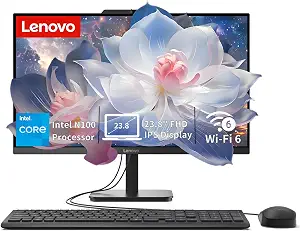
The Lenovo IdeaCentre All-in-One is the Best Overall pick here for shoppers who want a desktop centered on a built-in display and Windows 11 Home. Its 23.8-inch Full HD IPS anti-glare screen gives you a defined place to work, study, or manage household tasks without selecting a separate monitor as part of this listing. That arrangement may suit a desk where you want the computer and screen in one product. Check the exact Black Friday configuration before deciding: the listing describes this model, but an offer should be matched to the same product and specifications rather than judged by its name alone.
The Intel N100 processor is specified with 4 cores, 4 threads, up to 3.4GHz turbo, and 6MB cache. It is paired with 8GB DDR5 memory and a 512GB PCIe SSD. Those are useful details to compare against the applications and files you expect to use: consider whether the stated memory and storage fit your routine, and check the requirements of any demanding software rather than assuming suitability from the desktop format. The listed setup gives you Windows 11 Home, which is a key consideration if that is the operating system you prefer.
Connectivity is relatively concrete in the specification: Intel Wi-Fi 6 AX203, Bluetooth 5.2, and Gigabit Ethernet. The ports include 1 USB-C 10Gbps, 2 USB-A 2.0, 2 USB-A 10Gbps, HDMI-out 1.4b, RJ-45, and a 3.5mm headset jack. Before a Black Friday purchase, list the accessories you plan to connect and compare their needs with these ports; do not assume an unlisted accessory or feature is included. The product details support a straightforward reason for its Best Overall label among this selection: it combines a Windows desktop, an integrated display, and a broad stated set of wired and wireless connections. That label is an editorial fit, not a claim of measured superiority.
Key specs
Processor
Intel N100 processor, featuring 4 cores, 4 threads, up to 3.4GHz turbo, and 6MB cache.
Display
23.8-inch Full HD IPS anti-glare display
Memory
8GB DDR5 memory
Storage
512GB PCIe SSD
Operating system
Windows 11 Home
Connectivity
Intel Wi-Fi 6 AX203, Bluetooth 5.2, and Gigabit Ethernet.
Ports
1 USB-C 10Gbps, 2 USB-A 2.0, 2 USB-A 10Gbps, HDMI-out 1.4b, RJ-45, and a 3.5mm headset jack
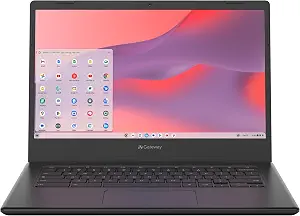
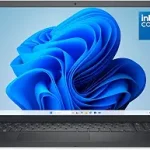
For a compact Chrome OS option, the acer Gateway Chromebook 314 CBO314-1H-C476 is the Best Budget choice among these featured computers. Its 14-inch Full HD Widescreen ComfyView Display and laptop format make it the option to consider when you want a computer you can use away from a fixed desktop setup. The listed operating system is Chrome OS, so decide whether that matches the applications and services you rely on before comparing Black Friday offers. The label identifies its role in this guide; it does not guarantee that every shopper will find it the lowest-priced or most suitable choice.
The configuration lists an Intel Celeron N4500 Dual-Core Processor, up to 2.8GHz, with 4GB LPDDR4X on-board memory and 64GB eMMC storage. Use those numbers to check the demands of your typical tasks and the space you expect to need, rather than treating a laptop name or an offer headline as a complete description. The specifications do not establish how a particular app or workload will perform. If you depend on specific software, verify its requirements and Chrome OS compatibility before making the purchase.
The wireless specification is 802.11ac Wi-Fi 5 with 2×2 MU-MIMO technology on dual-band 2.4GHz and 5GHz. The listed battery life is up to 10.5 hours; retain that qualification when comparing it with other computers, since it is not a guarantee for every pattern of use. For wired connections, the facts list 1 USB Type-C port, USB 3.2 Gen 1 up to 5 Gbps, DisplayPort over USB Type-C and USB charging, plus 1 USB 3.2 Gen 1 port. Think through whether those connections suit your accessories. During Black Friday, confirm that the offer is for the CBO314-1H-C476 and this configuration. Its Best Budget designation reflects the compact Chrome OS role and the listed entry-level memory and storage, not a price claim or a performance ranking.
Key specs
Processor
Intel Celeron N4500 Dual-Core Processor (Up to 2.8GHz)
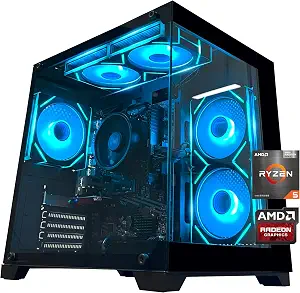
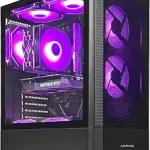
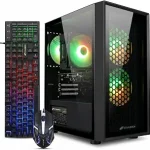
The Gaming PC Desktop Computer with AMD R5 5600GT is the Best for RGB-focused desktop setups in this group. The reason is specific: its cooling description includes 5 X 12cm ARGB fans, alongside AMD air cooling. That feature may matter if illuminated components are part of the look you want for a desktop space. The label is an editorial way to distinguish this tower, not evidence that it outperforms other gaming computers. For Black Friday, verify the exact tower and configuration in the offer instead of relying on a broad gaming-PC description.
The processor is an AMD Ryzen 5 5600GT listed at 3.6GHz, with 4.6GHz Turbo, 6 cores, and 12 threads. The graphics specification is AMD Radeon Vega Graphics (CPU Integration). That distinction is important when you are choosing a computer for games: check the requirements of the particular titles and the exact graphics configuration you need rather than assuming the product name establishes performance. The listed components are a starting point for comparing with your intended uses, not a substitute for those requirements.
The tower includes 16GB DDR4 3200MHz RAM paired with a 1TB M.2 NVMe PCIe SSD. It also lists an MSI A520M-A PRO motherboard and a 550W 80PLUS Bronze certified power supply. Built-in WiFi and a Bluetooth antenna are specified, giving you wireless connectivity details to consider alongside your setup. The facts supplied here do not specify every possible expansion option or included accessory, so check the precise listing if those are important to your decision. This desktop makes sense to shortlist if you value its stated memory and SSD capacities, its named processor, and especially the ARGB-fan description. Compare those exact details during Black Friday rather than treating a gaming label or visual feature as proof that it suits every game or workload.
Think about the physical setting before narrowing the Black Friday shortlist. The Lenovo is an all-in-one desktop with a 23.8-inch display, while the acer is a 14-inch laptop. The third option is described as a desktop tower. These are different arrangements, and the right one depends on whether you want a screen built into the computer, a laptop format, or a tower for a desktop setup. The product details do not establish what furniture, monitor, keyboard, or other accessories an offer includes, so check the specific listing if those items affect your plan.
For a shared desk or a home workspace, ask how much of your decision is about the screen and how much is about the computer itself. The IdeaCentre’s display is specified as Full HD IPS with an anti-glare finish. The Chromebook’s screen is a 14-inch Full HD Widescreen ComfyView display. Those descriptions give you concrete distinctions, but they do not tell you how either screen will look in your room. If portability matters, consider the Chromebook’s laptop form; if your priority is a desktop arrangement, compare the two desktop listings and the space available for them.
Black Friday listings can make dissimilar product types appear side by side. Avoid treating the lowest visible offer as the answer until you have decided which form factor suits your daily routine. A computer intended to stay at a desk and one intended to move between locations solve different practical problems. Match the item in the offer to that intended role, then weigh its actual specifications.
Choose an operating system before comparing offers
Operating system is one of the clearest differences in this selection: the Lenovo lists Windows 11 Home, the acer lists Chrome OS, and the gaming tower’s provided facts do not state an operating system. That missing detail should lead you to verify it in the exact listing if it matters—not to assume one is present or absent. Before Black Friday shopping, write down the applications and services you expect to use, then confirm they work with the operating system of the computer you are considering.
A familiar platform may simplify your choice, but familiarity is personal rather than a product advantage that applies to everyone. A shopper who specifically wants Chrome OS can focus on the acer and check their app requirements. Someone seeking Windows 11 Home can compare the Lenovo against their needs. For the tower, ask the listing to resolve the operating-system question before treating it as a match. A product category or a gaming-oriented name does not fill in an unspecified detail.
This check can prevent a tempting Black Friday offer from pulling attention away from a basic mismatch. Compare the exact model and its stated system, and verify any software requirements independently. Do not assume the computers share an ecosystem or that a program available on one will work on another. The useful decision is the one grounded in your own intended use and the product facts, not in a headline or a familiar brand.
Read the component list against your actual tasks
Memory, storage, and processor names are most useful when connected to what you plan to do. The Lenovo lists an Intel N100 with 8GB DDR5 memory and a 512GB PCIe SSD. The Chromebook lists an Intel Celeron N4500, 4GB LPDDR4X on-board memory, and 64GB eMMC. The tower lists an AMD Ryzen 5 5600GT and 16GB DDR4 3200MHz RAM with a 1TB M.2 NVMe PCIe SSD. These are factual differences, not a universal ranking for every application.
Make a short inventory of your usual work: the programs you rely on, the kinds of files you keep, and whether you need to install particular software. Then compare that inventory with each configuration. If storage capacity is central, the listed capacities offer a direct point of comparison; if you are unsure about a program’s needs, check its requirements rather than guessing from a processor label. Likewise, do not infer gaming suitability from the tower’s name alone: its listed graphics are AMD Radeon Vega Graphics integrated with the CPU.
Black Friday can emphasize product names while placing configurations side by side. Look past that shorthand and confirm that the model, memory, and storage in the offer are the ones you mean to buy. A specification that sounds impressive but does not address your own tasks may matter less than a more relevant operating system, screen format, or port. Use the stated parts as a checklist, not as a substitute for deciding what you need.
Check the connections you depend on
A connection list becomes meaningful when you compare it with the devices and network you already use. The Lenovo specifies Intel Wi-Fi 6 AX203, Bluetooth 5.2, and Gigabit Ethernet, plus USB-C, USB-A, HDMI-out 1.4b, RJ-45, and a headset jack. The Chromebook lists Wi-Fi 5 and two USB ports, including a USB Type-C port with DisplayPort over USB-C and USB charging. The tower specifies built-in WiFi and a Bluetooth antenna, without a detailed port list in the provided facts.
Before choosing, note which connections you actually need: a wired network connection, a particular USB connector, or a way to connect an accessory. Then check the precise port description rather than assuming that products in the same broad category offer the same selection. For the Chromebook, preserve the stated USB Type-C capabilities and speeds when you compare it. For the tower, look up the complete listing if you require specific ports, because the facts here do not enumerate them.
The same approach applies to wireless needs. Match the listed Wi-Fi details to your expectations, but do not assume a particular network result from a standard name alone. During Black Friday, confirm that the configuration attached to the offer matches the product you reviewed. This small check helps keep a convenient offer from becoming a poor fit for the accessories or connections that matter in your setup.
Use Black Friday as a prompt to verify the details
A Black Friday offer is a reason to compare carefully, not proof that a computer fits your needs. Start with the exact model name and configuration, then check the operating system, display, memory, storage, processor, and any connections you consider essential. These products have notably different roles, so an offer comparison should account for those differences rather than focus only on the category name. No price or discount information is provided here, so judge the actual offer you see without assuming that a promotion is active.
It can help to set your priorities before browsing: for example, a Windows all-in-one display, a Chrome OS laptop, or a tower with the stated ARGB fans. Decide which details are must-haves and which are simply attractive extras. If a listing leaves an important question unanswered—such as software compatibility or a specific connection—verify it on the exact product page before buying. Do not fill in gaps based on the computer’s appearance or label.
Finally, make sure the selected offer corresponds to the product you compared. Similar product names can conceal different configurations, and the facts that matter are the ones attached to the exact model. This approach makes Black Friday shopping more deliberate: compare relevant features, identify unresolved questions, and choose only when the computer’s stated setup fits your intended use.
Make your Black Friday choice
The best choice depends on the computer you actually need: an all-in-one Windows desktop, a Chrome OS laptop, or a tower distinguished here by its ARGB fans and listed components. Recheck the exact model and configuration during Black Friday, and give priority to the operating system, workspace, and specifications that matter to you. An offer is useful only when the computer behind it fits your plans.