Best Dell Monitor Buying Guide — Black Friday Deals 2026
A Dell monitor shortlist can look simple until screen format, refresh rate, connections, and adjustment options start pointing in different directions. These three models serve noticeably different priorities: a compact Full HD option, a QHD display with a flexible stand, and a Full HD gaming monitor with a particularly high listed refresh rate. The Best Overall and Best Budget labels here are editorial choices among these selections, not results of comparative testing. During Black Friday, treat the banner as a prompt to inspect the exact listing, not as proof that a particular configuration suits your setup. Start with the tasks you do most, then check the specifications and offer details against those needs.
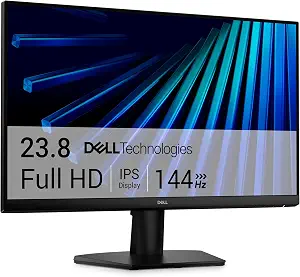
Best Budget: The Dell 24 Monitor – SE2426H is the straightforward choice for shoppers prioritizing a 23.8-inch screen and 1920×1080 resolution. The label identifies its role in this particular selection; it is not a statement about an unverified price or an across-the-market award. Its compact listed size may be easier to plan around than a larger display, while the Full HD format keeps the decision focused on a familiar resolution rather than the QHD option in this guide. When comparing Black Friday offers, verify that the listing is for this exact model and weigh its specifications against what your work and entertainment actually require.
This monitor pairs an IPS panel with a 144 hertz refresh rate, a 1 milliseconds response time, and FreeSync. Those details give shoppers several points to consider without needing to treat any one of them as a promise about an individual experience. Someone choosing a display for mixed everyday tasks may put size and resolution first; someone who cares about motion-related specifications may give the refresh rate and adaptive sync more attention. The listed 178 degrees viewing angle is another stated characteristic to consider if you often look at the screen from different positions. It is still worth deciding whether that detail is important in your own setup instead of treating it as a substitute for checking the whole listing.
Two HDMI ports are specified, which makes the connection count a useful part of the comparison if you plan to connect more than one HDMI source. Check the actual devices and connection plan you have in mind; do not assume that a port count alone resolves every setup question. The SE2426H is a sensible Black Friday candidate when you want a 23.8-inch Full HD Dell monitor and the listed combination of IPS, FreeSync, and refresh-rate details fits your priorities. Compare it with the QHD S2725DSM if resolution and stand adjustment matter more, or with the 27-inch SE2726HG if its gaming-oriented refresh rate is central to your choice.
Dell 27 Plus QHD Monitor – S2725DSM (ASIN B0GD1LMWH3)
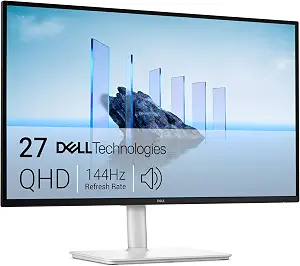
Best Overall: The Dell 27 Plus QHD Monitor – S2725DSM is the broadest-fit choice in this group for shoppers who want a higher-resolution format alongside more positioning options. Its 2560×1440 resolution provides a different starting point from the Full HD models here, while the IPS display technology and 144Hz refresh rate give you concrete details to weigh against your daily mix of work and entertainment. The label is a practical shortlist recommendation, not a claim that this screen is best for everyone. If your priority is a QHD Dell monitor rather than a particular gaming-focused refresh rate, this model deserves a close look during Black Friday.
The stand’s listed height, tilt, pivot, and swivel adjustability can matter when a fixed viewing position is not ideal. For example, someone sharing a workspace or frequently changing how they sit may value having several listed ways to reposition the display. Consider which adjustments you would actually use and whether the screen’s position is a bigger concern than the other models’ more gaming-specific headline. The listing also specifies 2 x 3W speakers, which may be relevant if built-in audio is part of your setup plan. Treat that as a specification to compare with your own sound needs rather than an assurance about how audio will suit a particular room or use.
Connectivity is listed as HDMI and DisplayPort 1.4. Before a Black Friday purchase, compare those connections with the equipment you intend to attach, rather than assuming an interface will suit every device or cable arrangement. This model’s 144Hz refresh rate and 1 milliseconds response time are useful details to consider if motion is part of your decision, but they do not by themselves settle which display is the right fit. Choose the S2725DSM if its QHD resolution, speaker specification, and broad stand adjustability align with your priorities. If Full HD and a more narrowly defined use case are enough, compare the other Dell options before deciding.
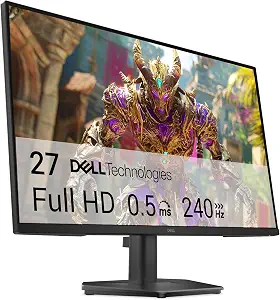
Best for high-refresh gaming: The Dell 27 240Hz Gaming Monitor – SE2726HG is the most direct match in this group for shoppers who put a high listed refresh rate at the center of their monitor search. Its 240 hertz specification is paired with a 1920 x 1080 pixels resolution and IPS display technology. That combination makes the decision less about choosing the highest resolution in this set and more about whether this model’s particular balance is the one you want. The label reflects a feature-based editorial choice among these products, not a claim of measured gaming superiority. During Black Friday, compare the exact model and its stated details rather than relying on a broad gaming label.
The listing also specifies AMD FreeSync Premium. If adaptive sync matters to your selection, include that exact wording in your comparison and check the rest of the monitor details alongside it. The listed video inputs are 2X HDMI and DisplayPort 1.4, so shoppers can use those interface details to review their intended connections. Confirm that the ports and arrangement suit the devices you plan to use instead of assuming that a shared connection name settles compatibility. The screen has tilt adjustment listed. If your desk routine depends on other forms of positioning, note that this stated adjustment is more limited in description than the S2725DSM’s listed height, tilt, pivot, and swivel options.
The SE2726HG’s 27-inch size may appeal to someone specifically seeking a larger Full HD gaming display, but screen size and resolution should be considered together as preferences, not as a universal quality ranking. Its 240 hertz refresh rate sets it apart from the other listed refresh-rate figures in this guide, while the SE2426H offers a smaller screen and the S2725DSM a QHD resolution. Those contrasts help define a shortlist; they do not establish which model will feel best for a particular game or setup. For Black Friday, choose this Dell monitor when its high-refresh focus, Full HD resolution, IPS technology, and stated inputs fit your plans. If you value QHD or more stand adjustment, look carefully at the alternatives before settling on it.
Key specs
Screen size
27 inches
Resolution
1920 x 1080 pixels
Refresh rate
240 hertz
Display technology
IPS
Adaptive sync
AMD FreeSync Premium
Video inputs
2X HDMI, DisplayPort 1.4
Screen adjustment
Tilt Adjustment
Let your usual screen tasks set the priorities
Before comparing specification lines, picture the work and entertainment that will occupy most of your screen time. A display used mainly for general tasks may lead you to prioritize size, resolution, and the way it sits on your desk. If gaming is a central reason for upgrading, refresh rate and adaptive-sync wording may deserve more attention. Someone alternating between different activities may prefer a more balanced list of requirements instead of choosing by a single headline feature. This exercise helps explain why the three Dell monitors here are not interchangeable, even though each can be considered for more than one kind of use.
The S2725DSM is the QHD option, with 2560×1440 resolution, 144Hz refresh rate, and several listed stand adjustments. The SE2426H pairs a 23.8-inch screen with 1920×1080 resolution, while the SE2726HG combines a 27-inch screen with 1920 x 1080 pixels and a 240 hertz refresh rate. Treat these distinctions as a way to sort your priorities, not as a scorecard. For Black Friday, write down the features you would genuinely use, then compare each candidate against that list. A feature that sounds impressive in an offer banner may not matter as much as a resolution, screen size, or adjustment option that directly fits your routine.
Choose a resolution with the whole display in mind
Resolution is most useful as a deliberate preference, considered alongside screen size and the work you expect to do. The QHD S2725DSM lists 2560×1440, whereas both other models list Full HD resolutions. That gives shoppers a clear format distinction, but it does not establish that one choice is universally better. Think about whether QHD is a priority for your intended use, or whether the Full HD models’ other characteristics are more important. The SE2426H’s 23.8-inch size and the SE2726HG’s 27-inch size also give you different screen-size options to evaluate.
Avoid treating a resolution label as a complete description of the viewing experience. Compare the stated figure with the model’s size, your preferred layout, and the tasks that matter to you. If you are weighing an offer during Black Friday, confirm that the listing names the same model you selected and displays the resolution you expect. Do not assume that two Dell monitors with similar names share the same screen format. A careful comparison of the exact model and its listed specification can keep a tempting headline from distracting you from the characteristic that matters most to your shortlist.
Make motion specifications answer a real question
Refresh rate is a useful point of comparison when motion is part of your decision, but it should be considered in context. The SE2726HG lists 240 hertz, while the SE2426H lists 144 hertz and the S2725DSM lists 144Hz. The SE2426H also lists a 1 milliseconds response time and FreeSync; the S2725DSM lists a 1 milliseconds response time; and the SE2726HG lists AMD FreeSync Premium. These are the provided specifications, not guarantees of a particular result in every use.
Ask yourself which motion-related details you actually want before letting a refresh-rate figure determine the whole purchase. If gaming is your main priority, the SE2726HG’s high listed rate may be a reason to examine it closely. If your needs include other features, such as QHD resolution or a more adjustable stand, the S2725DSM may deserve equal attention. The SE2426H offers another combination, including FreeSync and two HDMI ports. During Black Friday, compare the exact specification wording on the listing and keep your own priorities in view; a single number should not stand in for the full decision.
Black Friday listing checks that prevent a mismatched choice
A Black Friday promotion can draw attention to a product name before you have checked which version is being offered. Start by matching the complete model name: SE2426H, S2725DSM, or SE2726HG. Then confirm the stated screen size and resolution that matter to your choice. This is especially helpful when two options share a Full HD format but differ in size or other listed features. Keep your shortlist visible as you review the offer so that a headline does not blur distinctions between models.
Next, compare the product details with the needs you have already identified. Check refresh rate and response-time wording if those specifications influenced your choice; review the listed connections if you have a particular setup in mind; and note stand adjustments if positioning is important. Do not infer a discount, an included feature, or a configuration from promotional language alone. The available information here does not establish a current price or active promotion, so make your decision from the exact offer details shown at the time you shop. A careful model match is more useful than assuming that every listing with a Dell monitor headline describes the same product.
Treat connections and positioning as everyday fit questions
Connection details are easier to evaluate when you first identify what you intend to attach. The SE2426H lists two HDMI ports. The S2725DSM lists HDMI and DisplayPort 1.4 connectivity, and the SE2726HG lists 2X HDMI and DisplayPort 1.4 video inputs. Compare those specifications with the equipment and connection arrangement you plan to use, without assuming that the names alone confirm every compatibility detail. If audio is relevant, the S2725DSM’s listed 2 x 3W speakers are a concrete point to compare with your own needs.
Positioning deserves a similarly practical check. The S2725DSM specifies height, tilt, pivot, and swivel adjustability; the SE2726HG specifies tilt adjustment. Consider whether the screen’s position is likely to stay fixed or whether you value the listed ability to change it in several ways. The available facts do not state adjustment details for the SE2426H, so focus on what its listing confirms rather than guessing. A Black Friday decision is easier when you treat connections, audio, and positioning as part of fit—not as secondary details to revisit after choosing a model.
Make your Black Friday choice
The right Dell monitor in this guide depends on which tradeoff matters most to you. Choose the S2725DSM if QHD resolution, speakers, and its listed stand adjustments fit your priorities; consider the SE2426H for its 23.8-inch Full HD format and stated FreeSync and HDMI details; or focus on the SE2726HG if its 240 hertz refresh rate and gaming-oriented feature set match your plans. These recommendations are limited to the products presented here. When Black Friday offers appear, verify the exact model and specifications, then compare the offer against your own shortlist rather than chasing a headline. A thoughtful match is more useful than a rushed choice.