Best Graphics Buying Guide — Black Friday Deals 2026
A graphics-card shortlist is most useful when it starts with the work you want the card to support and the system it must fit. These three options put different details in focus: memory capacity and RDNA 4 architecture, a PCI Express 4.0 x8 interface with quiet-at-low-temperature fan behavior, or NVIDIA DLSS 4 and GDDR7 memory. Those distinctions can guide a Black Friday search, but they do not establish which card will perform best for your particular applications. First note your display connections, case clearance, power supply and preferred features. Then compare the exact model and variant on the offer page; a Black Friday headline alone is not enough to confirm you are considering the card described here.
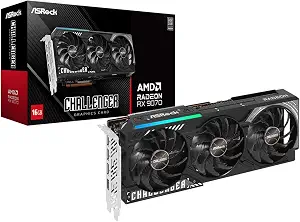
For a flexible starting point among these three listings, the RX 9070 Challenger earns the Best Overall label as an editorial choice, not as a measured ranking. Its RDNA 4 architecture, 56 CUs and 3584 stream processors provide concrete details to weigh if you want a card with a substantial set of stated GPU resources. The listed 16GB of GDDR6 on a 256-Bit Bus is another central part of the decision. Consider whether that capacity and the card’s other features suit the applications and games you intend to use; the specifications alone do not predict a particular frame rate or workload result.
Clock figures give another point of comparison without settling performance questions: the boost clock is up to 2520 MHz, with a game clock of 2070 MHz. The memory is specified at 20 Gbps. Read those figures alongside the rest of your build plan rather than treating a clock number as a guarantee of how a system will feel. The card uses PCIe 5.0, so check the interface against the motherboard and system details you have, and confirm any compatibility questions with the relevant component documentation before ordering.
The practical fit checks are especially important before a Black Friday purchase. This is a 2.5-slot card measuring 290x123x51mm, with two 8-pin power connectors and a recommended 700W PSU. Measure the available card space and verify that the power supply and connectors in your intended system meet the listed requirements. These are separate checks: a card can satisfy one requirement while still needing another part of your build reviewed. Do not assume that a deal page has evaluated your case or power setup for you.
If your priorities include the stated memory capacity, RDNA 4 architecture and PCIe 5.0 interface, this is a coherent option to investigate first. For Black Friday, confirm that the offer identifies the RX 9070 Challenger 16GB OC rather than a similarly named card, then review the specifications and seller’s listed terms on that exact offer. The Best Overall label is intended to help organize this three-card guide; it does not promise universal suitability. Choose it when its listed features and your confirmed system requirements line up, not simply because the label or seasonal presentation catches your eye.
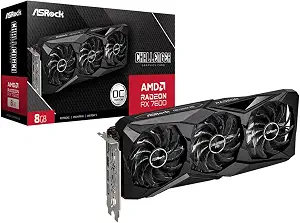
ASRock Radeon RX 7600 Challenger Pro 8GB OC (ASIN B0G6FCDZMK)
The RX 7600 Challenger Pro receives the Best Budget label in this guide as an editorial way to frame the shortlist, not as a claim about its price or a Black Friday discount. If your decision begins with a specific card layout, power requirement or output plan, this listing offers several useful details to check. It has 8GB of GDDR6 memory on a 128-bit interface running at 18 Gbps. Its stated clock speeds are a max boost clock of up to 2695 MHz and a game clock of 2280 MHz. These figures describe the product; they do not establish how it will perform in your own applications.
A distinctive practical feature is 0dB Silent Cooling, which stops the fans completely under low temperatures. Treat that wording narrowly: it describes fan behavior under the stated low-temperature condition, not a promise that the card will always be silent. Its outputs include three DisplayPort 1.4a with DSC and one HDMI 2.1 port. Before choosing it for a workstation or gaming setup, compare those connections with the displays and cables you plan to use, and verify any resolution or refresh-rate requirements from the display and card documentation.
The interface is PCI Express 4.0 x8, with compatibility stated for PCIe 4.0 and 3.0 motherboards. Its power requirement is a single 8-pin connector and a recommended 550W power supply. The physical dimensions are 2.5-slot and 303 mm (L) x 131 mm (W) x 45 mm (H). Check available case clearance, power supply capacity and connector availability independently; a fitting length does not settle every installation question. These checks are worthwhile whether you are planning an upgrade or assembling a system around a Black Friday offer.
This card may be the more relevant shortlist candidate if the listed 0dB fan behavior, output mix or PCIe compatibility aligns with what you need to verify. The Best Budget designation does not mean it is automatically the least expensive choice, and no price or discount is assumed here. During Black Friday browsing, match the offer to the exact Challenger Pro 8GB OC name and confirm the stated variant before comparing its terms with alternatives. Use the specifications as a checklist for your intended tasks and build; do not use the label as a substitute for checking fit, power and display connections.
Key specs
Memory
8GB of GDDR6 memory on a 128‑bit interface running at 18 Gbps
Clock speeds
a max boost clock of up to 2695 MHz, a game clock of 2280 MHz
Power requirements
requires a single 8‑pin power connector and a recommended 550W power supply
Dimensions
2.5‑slot card measuring 303 mm (L) x 131 mm (W) x 45 mm (H)
Cooling
0dB Silent Cooling stops fans completely under low temperatures
Display connections
Includes three DisplayPort 1.4a with DSC and one HDMI 2.1 port
Interface
PCI Express 4.0 x8 interface (compatible with PCIe 4.0 and 3.0 motherboards)
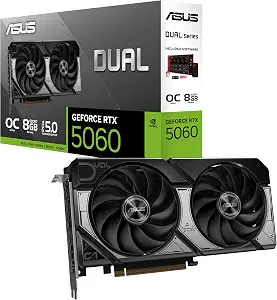
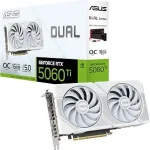
ASUS Dual NVIDIA GeForce RTX 5060 8GB GDDR7 OC Edition
The ASUS Dual RTX 5060 is the guide’s Best for DLSS 4 Upscaling pick because DLSS 4 is the most clearly named feature in its supplied specifications. That label points to a specific reason to consider the card; it is not a statement about comparative performance or suitability for every game. If upscaling is part of how you plan to use a graphics card, identify whether the applications you care about support the feature and consult their documentation. The listing also specifies 8GB of GDDR7 memory and a PCIe 5.0 interface, details you can weigh against your system and priorities.
The card lists OC mode at 2565 MHz and Default mode at 2535 MHz. Keep the two modes in context: these are the stated clock figures, not a prediction of results in a particular workload. For display planning, the native outputs are DisplayPort 2.1b x3 and HDMI 2.1b. Compare those named connections with the inputs on your displays and the cabling you intend to use. If a particular display feature matters to you, verify its requirements rather than assuming that a port name alone confirms every setup detail.
The 2.5-Slot Design is a useful reminder to inspect the physical layout of your case before ordering. The supplied facts do not give this card’s dimensions or power requirements, so do not infer those from another card in the shortlist. Look for those details on the exact product offer and consult the appropriate system documentation to determine whether the intended installation is suitable. That check matters during Black Friday when adjacent listings or variants can look alike, and when a prominent feature can draw attention away from basic fit questions.
The Axial-tech fan design is described as having a smaller fan hub that facilitates longer blades and a barrier ring that increases downward air pressure. You can treat that as a design feature to consider, without assuming a noise level or cooling result not stated here. If DLSS 4, GDDR7, or the listed outputs match your priorities, compare the exact ASUS Dual NVIDIA GeForce RTX 5060 8GB GDDR7 OC Edition offer. For a Black Friday decision, verify the variant and its complete listed specifications before placing it on your final shortlist.
Key specs
Memory
8GB GDDR7
Interface
PCIe 5.0
Upscaling
DLSS 4
Video outputs
Native DisplayPort 2.1b x3, Native HDMI 2.1b
Design
2.5-Slot Design
Fan design
Axial-tech fan design features a smaller fan hub that facilitates longer blades and a barrier ring that increases downward air pressure
Begin by writing down what you expect the graphics card to support: the applications or games you use, the displays you connect and any named features you specifically want. This keeps a Black Friday search tied to your needs rather than to the most prominent headline. The RX 9070 Challenger’s stated RDNA 4 architecture and 16GB of GDDR6, the RX 7600 Challenger Pro’s 0dB Silent Cooling feature, and the ASUS card’s DLSS 4 support offer different decision points. None of those facts, by itself, confirms how a particular program will behave.
Next, distinguish requirements from preferences. A display connection you must use, a power connector your system needs, or a confirmed case-space limit is a practical constraint. Memory type, a named feature or a clock figure may be a preference to weigh once those constraints are understood. Check application or display documentation where compatibility or support is important. If a detail is not included in the listing information, look for it on the exact offer rather than filling the gap with an assumption.
This simple sequence can help prevent a seasonal deal from reshaping your plan: define the task, identify hard system requirements, and then compare desirable features. Keep notes on why each product remains on your list. The RX 9070 may suit a shortlist centered on its stated architecture and memory; the RX 7600 may merit attention for its listed fan behavior and outputs; the ASUS option may interest someone prioritizing DLSS 4. Those are ways to organize research, not predictions of which card is best for every user.
Check the exact Black Friday listing, not just the headline
A Black Friday page can make an offer easy to notice while leaving the most important identification details farther down the listing. Confirm the complete product name and model variant before comparing anything. In this guide, that means distinguishing the RX 9070 Challenger 16GB OC, RX 7600 Challenger Pro 8GB OC and ASUS Dual NVIDIA GeForce RTX 5060 8GB GDDR7 OC Edition. Similar product-family names do not prove that two listings describe the same card or configuration.
Then read the specifications shown for the exact offer. Check that the memory, interface, outputs and other details you care about match the relevant product listing. If the offer page does not make a needed specification clear, do not assume that another model in the same family shares it. Review the offer’s displayed terms directly as well; this guide does not establish a sale price, discount, availability or seller policy.
Compare offers only after confirming identity and requirements. A lower displayed figure, if one appears, does not resolve whether the card fits your case, meets your power plan or provides the ports you need. Keep a short note of the full variant and the specifications you verified so that switching between Black Friday tabs does not blur product details. That small bit of organization makes it easier to compare like with like and avoid treating the seasonal label as evidence of value on its own.
Treat installation space and power as separate checks
A card’s slot description and measurements help you check physical fit, but they are not interchangeable with a power review. The RX 9070 Challenger is listed as a 2.5-slot card measuring 290x123x51mm; the RX 7600 Challenger Pro is also 2.5-slot and measures 303 mm (L) x 131 mm (W) x 45 mm (H). Compare the relevant figures with the space available in your case and consult your case documentation if you need installation guidance. Do not assume that one dimension alone settles clearance.
Power needs call for a separate pass through your system details. The RX 9070 listing specifies two 8-pin power connectors and a recommended 700W PSU. The RX 7600 listing specifies a single 8-pin connector and a recommended 550W power supply. Confirm that the intended power supply and available connector arrangement meet the requirements for the exact card. Those recommendations are product-specific; do not transfer one card’s stated requirement to another.
The ASUS listing gives a 2.5-Slot Design, but the supplied facts here do not state its dimensions or power requirements. Look those up on the exact Black Friday offer and verify them against your system rather than borrowing figures from either ASRock card. Make this a two-part check: first confirm physical room, then confirm power supply and connector details. If either remains uncertain, pause to consult the relevant component documentation before ordering. A seasonal deal is less useful than a card you have not confirmed can be installed.
Line up outputs with the displays you plan to use
List the inputs on your displays and the connections you expect to use before choosing among these cards. The RX 7600 Challenger Pro specifies three DisplayPort 1.4a with DSC and one HDMI 2.1 port. The ASUS Dual lists native DisplayPort 2.1b x3 and native HDMI 2.1b. Those names give you a concrete basis for checking your setup, but they do not automatically establish every display mode your combination can support.
For the RX 9070 Challenger, the provided specifications do not list video outputs. If its other features make it a leading Black Friday candidate, check the exact offer and relevant documentation for the outputs you need rather than inferring them from another Radeon card. In the same way, if a specific resolution, refresh rate or feature is essential, verify the requirements for the card, display and any other equipment in the connection path. Do not rely on a port label alone to answer a question the listing does not address.
This display-first check can also help make your shopping comparison more precise. Mark which listed output combinations meet your known connection needs, and set aside any product whose details still need verification. Then compare other priorities, such as the RX 7600’s stated fan behavior or the ASUS card’s DLSS 4 feature. During Black Friday, keep the exact product variant visible while moving between offers so that the connection information you checked remains attached to the right card.
Weigh memory and named features without predicting results
Memory specifications are useful for distinguishing these listings, but they are not a standalone measure of how an application will perform. The RX 9070 Challenger specifies 16GB of GDDR6 on a 256-Bit Bus and 20 Gbps memory. The RX 7600 Challenger Pro specifies 8GB of GDDR6 on a 128-bit interface running at 18 Gbps. The ASUS Dual lists 8GB of GDDR7. Treat those as product facts to compare with the requirements of your intended software; do not turn them into a performance promise.
Other named features may be more relevant to your own priorities. The ASUS card lists DLSS 4, while the RX 7600 card describes 0dB Silent Cooling that stops fans completely under low temperatures. The RX 9070 card specifies RDNA 4 architecture. Ask which detail connects directly to the tasks or preferences you have already identified, and check application support when that matters. The presence of a feature in a listing does not prove that every program uses it or that it will change your experience in a particular way.
Clock figures can round out the comparison, but keep the listed modes and qualifications intact. The RX 9070 has a boost clock up to 2520 MHz and a game clock of 2070 MHz; the RX 7600 lists a max boost clock of up to 2695 MHz and a game clock of 2280 MHz. The ASUS listing gives OC mode and Default mode figures. Do not rank cards by reading clock values alone. Use the full specification set, your confirmed system needs and the exact Black Friday offer to reach a careful decision.
Make your Black Friday choice
A sound choice comes from matching a card’s stated features to your intended tasks, then confirming that the exact variant fits your system and display plan. Keep the labels in this guide in perspective: Best Overall, Best Budget and Best for DLSS 4 Upscaling organize these three options, but they are not guarantees of performance or price. During Black Friday, check the complete model identity, offer details and specifications you still need before deciding. If a key detail is unclear, verify it rather than guessing. That approach keeps the final choice grounded in your requirements instead of the seasonal promotion.