Nikon COOLPIX P1100 Superzoom Digital Camera (ASIN B0DWSYJLGJ)
Best Nikon Camera Buying Guide — Black Friday Deals 2026
Choosing a Nikon camera starts with the kind of framing and recording you expect to do—not the biggest feature list. These options suit different plans: a two-lens mirrorless kit with subject detection, a two-lens camera with creator-focused recording details, or a superzoom built around a very broad equivalent focal range. For Black Friday, treat each listing as a specific package rather than assuming every offer includes the same items. Check the exact model and included lenses, then weigh the features you would actually use. The goal is to match the camera to your routine, whether that means carrying two lenses, recording yourself, or reaching distant subjects with one camera.
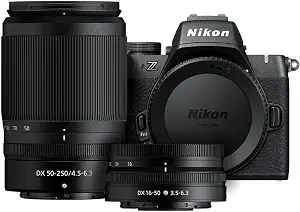
The Nikon Z50 II with Two Lenses is the Best Overall pick in this group for shoppers who want a versatile mirrorless kit and several ways to shape the finished image. Its 20.9-megapixel DX format (APS-C size) sensor is paired here with the NIKKOR Z DX 16-50mm f/3.5-6.3 VR and NIKKOR Z DX 50-250mm f/4.5-6.3 VR lenses. That combination gives you two distinct focal ranges to consider for everyday scenes, portraits, and subjects farther away. The practical question is whether you expect to switch lenses as your plans change, rather than relying on one fixed zoom range.
For a planned outing, you might begin with the 16-50mm lens for a broader range of scenes, then choose the 50-250mm lens when you want a longer reach. The camera can automatically detect and accurately track nine distinct subjects, a feature to consider if your photos include varied subjects. Its 31 built-in Picture Control presets provide options for changing the look of images in camera. These are concrete creative and focusing features to compare against your own priorities; they are not a promise that one setting will suit every subject or lighting situation.
Video is listed as 4K UHD/60p, and the free Nikon SnapBridge app can send photos and video to a smart device in seconds. Those details may matter if your routine includes both video capture and sharing on a phone or tablet. For Black Friday, confirm that the offer is for this Z50 II two-lens package, and check that both named lenses appear in the kit contents. The Best Overall label is an editorial choice among these three cameras, not a claim of measured superiority. This kit makes most sense when its two lenses and specified subject and video features align with the way you plan to shoot.
Key specs
Sensor
20.9-megapixel DX format (APS-C size) sensor
Included lenses
Includes the NIKKOR Z DX 16-50mm f/3.5-6.3 VR lens and NIKKOR Z DX 50-250mm f/4.5-6.3 VR lens
Picture Control presets
31 built-in presets
Subject detection
automatically detect and accurately track nine distinct subjects
Video
4K UHD/60p
Photo sharing
Send photos and video to your smart device in seconds using the free Nikon SnapBridge app.
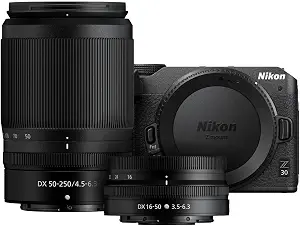
The Nikon Z 30 with Two Lenses is the Best Budget choice among these options, especially for shoppers whose plans center on recording themselves as well as taking stills. The package includes a 16-50mm wide-angle zoom lens and a 50-250mm telephoto zoom lens, giving you two focal ranges to consider for different scenes. Before choosing it, decide whether the two-lens setup fits the way you want to frame subjects, or whether you would rather prioritize a camera with a different set of supplied features. The Best Budget label is an editorial distinction within this selection; it does not guarantee a particular price or a Black Friday discount.
For self-recording, the flip out touchscreen selfie monitor gives you a screen that can face your position while you frame a shot. The built-in stereo microphone has adjustable sensitivity, a useful detail to consider when planning how to capture sound. The camera also supports 4K resolution video and Full HD 60p streaming over USB-C. These are different recording options, so think through whether you mainly plan to make video, stream, or use the camera for both. Autofocus with eye tracking for people and pets is another stated feature to weigh if those are common subjects in your plans.
This camera may suit a creator’s checklist better than a buyer whose main priority is extensive in-camera subject detection or a very long built-in zoom; compare the stated features rather than assuming anything about unlisted capabilities. For Black Friday, inspect the exact Z 30 listing and verify that it names both the 16-50mm and 50-250mm lenses. Also check that the offer refers to the same model and package you intended to compare. The Best Budget label does not establish that this is the lowest-priced Nikon camera or that a deal is active. Its strongest case here is the combination of two lenses, a selfie monitor, microphone details, and stated recording options.
Key specs
Wide-angle lens
16-50mm wide-angle zoom lens
Telephoto lens
50-250mm telephoto zoom lens
Video resolution
4K resolution
Autofocus
autofocus with eye tracking for people and pets
Monitor
Flip out touchscreen selfie monitor
Microphone
built-in stereo microphone with adjustable sensitivity
Nikon COOLPIX P1100 Superzoom Digital Camera (ASIN B0DWSYJLGJ)
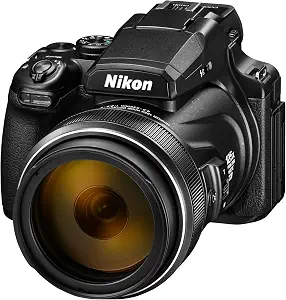
The Nikon COOLPIX P1100 Superzoom Digital Camera is the Best for extreme reach option, based on its stated 125x Optical Zoom and equivalent 24-3000mm focal range. That breadth makes it a distinct choice for someone who wants a camera built around framing subjects at widely varying distances without choosing between the two supplied lenses found in the mirrorless kits. Its 16 MP still resolution and 4K Ultra HD Video are also listed, so consider whether the long zoom range is more central to your plans than the lens-package approach of the other cameras.
Imagine planning a day around distant subjects and then noticing a small detail nearby. The P1100 lists Dual Detect Optical VR image stabilization, equivalent to shooting at a shutter speed 4.0 stops, and macro focus at approximately 1 cm from your subject. Those details offer specific points to consider for handheld framing and close-up plans. The camera also has a rotating LCD screen, which may be useful when you want to adjust your viewing angle. Its stated image formats are JPEG or .NRW (RAW), so check whether either format fits the way you intend to manage photos.
The tradeoff to weigh is the type of flexibility you want: this option centers on a 125x optical zoom, while the Z50 II and Z 30 packages list separate lenses with their own ranges. That is a difference in approach, not proof that one camera is universally better. For Black Friday, verify the exact P1100 model and the package details on the offer you are considering; do not assume that another Nikon superzoom listing has identical specifications. The Best for extreme reach label reflects the supplied zoom specification, not a test result. Choose it when that unusually broad equivalent focal range is the feature your plans most depend on.
Key specs
Optical zoom
125x Optical Zoom
Focal range
equivalent to 24-3000mm
Image stabilization
Dual Detect Optical VR image stabilization, equivalent to shooting at a shutter speed 4.0 stops.
Still resolution
16 MP
Video
4K Ultra HD Video
Display
Rotating LCD Screen
Macro focus
approx. 1 cm from your subject
Image formats
JPEG or .NRW (RAW) photos
Start with the distance and framing your plans demand
Picture the scenes you are likely to photograph before comparing camera names. If you expect to move between broader views and more distant subjects, the Z50 II and Z 30 packages each include a 16-50mm lens and a 50-250mm lens, though their other listed features differ. That means your decision can begin with whether carrying and changing between two lenses suits your plans. The P1100 takes a different route: its stated 125x Optical Zoom covers an equivalent 24-3000mm range. Consider whether that one-camera zoom approach is the defining need, rather than treating its range as a general substitute for every other feature.
A useful Black Friday comparison starts with the actual package, not a headline suggesting a camera is versatile. Read the exact model name and lens contents for either mirrorless kit, and compare them with the P1100’s stated zoom range. Next, write down the kinds of scenes you want to frame: broad everyday views, subjects farther away, or a mix of both. This keeps a tempting offer from drawing attention away from an important mismatch. No focal range can tell you which framing you will prefer, but the supplied figures make the different approaches clear enough to guide a shortlist.
Plan how focusing and subject tracking fit your scenes
Focusing details matter most when they correspond to subjects you expect to photograph. The Z50 II is listed with automatic detection and accurate tracking for nine distinct subjects. The Z 30 lists autofocus with eye tracking for people and pets. Those are not identical descriptions, so consider which one addresses the subjects you have in mind rather than assuming they perform the same task. If you expect to photograph people and pets, the Z 30’s specified eye tracking is directly relevant; if a broader set of detected subjects interests you, examine the Z50 II’s feature as described.
The P1100’s listed strengths point to a different decision: its zoom range and stated close-focus ability, with macro focus at approximately 1 cm from the subject. That gives shoppers who plan both distant framing and close-up subjects a specification to investigate. It does not establish how a camera will handle every situation, so keep your expectations tied to the stated details. During Black Friday shopping, compare the exact model’s listed focusing features with your subject list. Avoid choosing based on a general promise of autofocus when the specific feature that matters to you is named on one of the other packages.
Choose a screen and handling approach that suits the task
How you look at the frame can shape the kind of camera that feels suitable for a planned recording routine. The Z 30 includes a flip out touchscreen selfie monitor, a clearly relevant feature if you expect to point the camera toward yourself. The P1100 lists a rotating LCD screen, which offers a different stated display detail to consider. These descriptions do not establish that either screen is preferable for every person or setup; think about whether you need a screen that faces you or simply want the listed rotating display.
The supplied facts for the Z50 II do not describe its display, so do not assume a particular screen arrangement when comparing it. Instead, check the exact offer details if screen handling is essential to your decision. This is especially useful during Black Friday, when shoppers may scan several packages quickly and confuse one model’s features with another’s. Make a short checklist of the viewing details that matter, then verify them for the specific camera you plan to buy. If a key detail is not included in the information you are comparing, seek confirmation in the listing rather than treating silence as evidence that the camera does or does not have it.
Match video and sharing options to your recording routine
The video specifications differ, so decide what kind of recording you expect before settling on a package. The Z50 II lists 4K UHD/60p, while the Z 30 lists 4K resolution and Full HD 60p streaming over USB-C. The P1100 lists 4K Ultra HD Video. Those descriptions are worth comparing as written; they do not by themselves establish that the cameras have identical recording modes. If streaming is part of your plan, the Z 30’s stated USB-C streaming detail is a specific point to weigh. If you mainly want video capture, compare the listed resolutions with your own needs.
Sharing and sound may also influence the choice. The Z50 II can send photos and video to a smart device in seconds using the free Nikon SnapBridge app. The Z 30 has a built-in stereo microphone with adjustable sensitivity. For Black Friday, include these features in the offer comparison instead of focusing only on a headline video resolution. A creator who prioritizes self-recording and streaming may value different details from a shopper who wants a two-lens kit and phone sharing. Keep the distinction practical: choose features that support your planned process, not a longer list simply because it appears more impressive.
Check the exact package before comparing Black Friday offers
A camera offer is only useful to compare when you know which model and package it describes. The Z50 II and Z 30 listings here each specify two lenses, but the model names and other features are different. Confirm both lens names in the package details before treating the kits as equivalent. For the P1100, check that the listing is for the COOLPIX P1100 and compare its stated zoom, display, video, and file details with what you need. Do not assume a listing with a similar name includes the same camera or accessories.
Make a simple Black Friday checklist: confirm the exact model, verify the lens or zoom configuration, and match the listed features against your intended use. Then compare the offer terms as presented, without assuming there is a promotion or that a discount applies to every variant. If a detail important to your choice is unclear, pause and verify it on the specific listing. This approach helps keep a headline, image, or bundle label from substituting for the package information. It also makes the decision easier to explain: you can identify what the offer includes and why those features fit your plans.
Make your Black Friday choice
The right Nikon camera depends on which constraint matters most in your plans. Choose the Z50 II if its two-lens kit, specified subject detection, Picture Control presets, video, and SnapBridge sharing fit your priorities. Consider the Z 30 if its lens package and stated selfie-monitor, microphone, eye-tracking, and streaming details suit your recording routine. Look to the P1100 when its 125x Optical Zoom is the central draw. For Black Friday, verify the exact model and included package before comparing offers, and let the features you will use—not the size of a headline—make the final choice.