SAMSUNG 34″ ViewFinity S50GC Series Ultra-WQHD Monitor (ASIN B0C1KPXPM9)
Best Samsung Monitor Buying Guide — Black Friday Deals 2026
A Samsung monitor shortlist makes more sense when it starts with the work the screen must do, rather than a Black Friday headline. The three options here cover distinct needs: a curved QHD gaming display, a curved Full HD screen for everyday computing, and an ultrawide monitor for a broader workspace. Compare the exact model and its listed specifications with your desk routine, then check that the offer is for the variant you intended. Black Friday can be a useful time to compare, but a deal is only relevant if the screen’s size, format, and connections fit your setup.
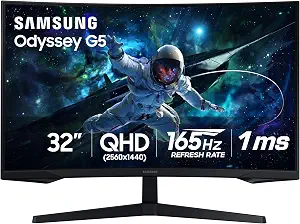
Samsung 32″ Odyssey (G55C) Series QHD 1000R Curved Gaming Monitor
Best Overall is the editorial pick for shoppers who want a gaming-oriented Samsung monitor with a combination of QHD resolution, a high listed refresh rate, and a pronounced curved display. The 32-inch Odyssey G55C has a 2560×1440 resolution, a 165 hertz refresh rate, and a 1 milliseconds response time. Its 1000R curvature gives the screen a distinct shape, so consider whether that format suits your desk and viewing preference before adding it to a Black Friday shortlist. The HDR10 specification and DisplayPort and HDMI connectivity round out the listed features.
Think about the kinds of games and other tasks you expect to use on the screen. A 32-inch display may appeal if you want a larger monitor, while the QHD resolution is a key detail to compare with your computer and preferred image settings. The refresh and response figures are useful selection criteria, not a guarantee of how every game will look or feel. Review the rest of your setup and the specific connection you plan to use; the listed inputs are DisplayPort and HDMI.
This is the strongest match among these choices for someone prioritizing the gaming-focused specifications in its name and listing, which is why it receives the Best Overall label here—not a claim of measured superiority or a market-wide award. It may be less suitable if a curved screen or the listed size does not work for your workspace. During Black Friday, compare the exact G55C model in the offer and confirm that its resolution, curvature, refresh rate, response time, and inputs match what you want. Do not assume a promotional headline refers to this precise configuration.
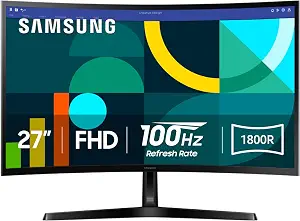
Best Budget is the editorial label for the 27-inch Samsung Essential S3 S36GD, a curved Full HD monitor with a straightforward set of listed specifications. Its resolution is 1920 x 1080 pixels, its refresh rate is 100 hertz, and its response time is 4 milliseconds. The display has 1800R curvature and a listed contrast ratio of 3,000:1. For everyday computing, these details give shoppers a practical starting point: decide whether a 27-inch curved screen and Full HD resolution fit the space and work you have in mind before comparing Black Friday offers.
The listing also specifies D-Sub and HDMI connectivity, plus Blue Light Filter and Flicker-Free eye comfort features. Check your planned connection against those inputs, and consider whether the listed comfort features matter for the way you use a monitor. They are concrete details to compare rather than a reason to assume that every screen will feel comfortable for every person. If you are weighing this model against the Odyssey, consider the different screen sizes, resolutions, refresh and response figures, and curve specifications without treating any one number as a complete verdict.
This model earns Best Budget as an editorial choice among the three products in this guide, not as a statement about its current price or a measured ranking. It is worth considering if you prefer its Full HD format and want the specified eye comfort features. On Black Friday, check the exact S36GD model and the actual offer details rather than relying on a general Samsung monitor promotion. Confirm that the listing matches the size, resolution, curvature, connections, and features you planned around. The label does not promise a discount, nor does it establish that the offer is the lowest available.
Key specs
Screen size
27 inches
Resolution
1920 x 1080 pixels
Refresh rate
100 hertz
Contrast ratio
3,000:1
Response time
4 milliseconds
Connectivity
D-Sub, HDMI
Eye comfort features
Blue Light Filter, Flicker-Free
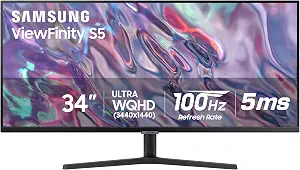
SAMSUNG 34″ ViewFinity S50GC Series Ultra-WQHD Monitor
SAMSUNG 34″ ViewFinity S50GC Series Ultra-WQHD Monitor (ASIN B0C1KPXPM9)
Best for Wide-Format Workspaces is the editorial label for the 34-inch Samsung ViewFinity S50GC. Its Ultra-WQHD resolution is 3440 x 1440 pixels, with a 21:9 aspect ratio and a matte screen finish. That combination makes this option the natural one to examine if your priority is a wider display format, rather than a curved gaming screen or a 27-inch Full HD monitor. Its listed refresh rate is 100 hertz and response time is 5 milliseconds. The listing also specifies HDR10 and FreeSync.
For a desk with more than one source in the routine, note the PBP feature: it can show input from 2 simultaneous sources at native resolution. Think through whether that specific function would be useful for your workflow, and check which connections your intended sources require before choosing. The supplied specifications do not identify the monitor’s ports, so verify them in the actual offer rather than assuming a connection type. The matte finish is another stated detail to weigh according to your own preferences and workspace.
This ViewFinity is a fit to consider when a wide format and the stated multi-source viewing feature are central to your decision. The Best for Wide-Format Workspaces label describes that editorial match; it does not claim that the monitor is best for every desk or task. During Black Friday, compare the exact S50GC listing and make sure the offer corresponds to the 34-inch, 21:9 configuration you want. Check the listed resolution, finish, PBP description, and connection details against your sources and daily tasks. A lower advertised price would not by itself establish that this option suits your workspace better than the alternatives.
Key specs
Screen size
34 inches
Resolution
3440 x 1440 pixels
Aspect ratio
21:9
Refresh rate
100 hertz
Response time
5 milliseconds
Screen finish
Matte
Picture quality
HDR10
Adaptive sync
FreeSync
Multi-source viewing
With PBP, view input from 2 simultaneous sources at native resolution
First choose the screen’s job, then its shape
Start by writing down the main role you need the monitor to serve. For gaming-focused specifications and a curved display, the Odyssey G55C is the clearest candidate in this group. For a smaller curved Full HD screen with listed eye comfort features, consider the Essential S3. For a wider workspace and PBP viewing from two sources, look at the ViewFinity S50GC. These are different starting points, not interchangeable versions of the same screen.
Next, picture the monitor in your actual work area. Compare the listed screen sizes and curvature with how much space you can devote to a display and the viewing shape you prefer. A curved screen may be a deciding feature for one shopper and a reason to choose another format for someone else; the specifications alone cannot settle that personal preference. Black Friday browsing can make it tempting to start with the offer, but first decide which shape and role you would willingly use every day. That shortlist will make the eventual deal comparison more meaningful.
Match resolution and format to the tasks you do
Resolution and aspect ratio help distinguish these Samsung monitors. The Essential S3 is Full HD at 1920 x 1080 pixels; the Odyssey offers 2560×1440; and the ViewFinity is 3440 x 1440 pixels in a 21:9 format. Consider what you typically keep on screen, how much width is useful, and which resolution makes sense for your planned tasks. The wide ViewFinity format and its PBP feature may be relevant if viewing input from two simultaneous sources at native resolution is part of your workflow.
Avoid choosing from resolution alone. Compare it with the stated screen size, the intended use, and the computer or sources you plan to connect. The product records do not establish how a particular application will appear or what a specific computer can output, so verify those points for your equipment. On Black Friday, use the exact model details to separate a monitor that fits your work from one that merely looks appealing in a promotion. A wider canvas, a curved Full HD screen, and a QHD gaming-oriented option answer different workspace priorities.
Use motion specifications as filters, not promises
If motion-related specifications matter to you, compare both refresh rate and response time across the exact models. The Odyssey lists 165 hertz and 1 milliseconds; the Essential S3 lists 100 hertz and 4 milliseconds; the ViewFinity lists 100 hertz and 5 milliseconds. These figures can help narrow a shortlist toward the specifications you value, but they do not independently predict the experience with every game, video, or computer configuration.
Then consider the rest of the picture. The Odyssey and ViewFinity listings specify HDR10, while the ViewFinity also lists FreeSync. Match those stated features to what you are looking for, without assuming that a feature guarantees a particular result. The Essential S3 instead lists a 3,000:1 contrast ratio alongside its refresh and response figures. During Black Friday, resist treating a larger figure as an automatic reason to buy. Confirm the exact model and weigh the complete set of specifications against your priorities, rather than making a decision from one number in an offer headline.
Check the connection plan before settling on a model
Write down which devices or sources you plan to connect, then check the listed inputs for the monitor under consideration. The Odyssey specifies DisplayPort and HDMI. The Essential S3 specifies D-Sub and HDMI. The ViewFinity facts provided here describe PBP viewing from two simultaneous sources but do not list its ports, so inspect the actual product details for the connection information you need. Do not infer an unlisted port from the monitor’s name or from a general product image.
For the ViewFinity, decide whether PBP would be useful before letting that feature drive your choice. For either curved model, consider the curvature alongside the tasks and desk arrangement you have in mind. The Essential S3’s Blue Light Filter and Flicker-Free features may also be relevant to your personal selection criteria. A Black Friday deal deserves a closer look only after these practical checks: an attractive offer does not resolve a mismatch between the connections you need and the details shown for the exact variant.
Make Black Friday comparisons model-specific
When an offer catches your attention, verify the complete model name and compare its listed specifications with your shortlist. Check screen size, resolution, shape or aspect ratio, and the features that mattered most in your decision. For the Odyssey, that may mean confirming the G55C’s QHD resolution and 1000R curvature. For the Essential S3, check that the S36GD details match the Full HD curved screen and inputs you planned around. For the ViewFinity, make sure the S50GC offer corresponds to the Ultra-WQHD, 21:9 model.
Then assess the offer itself using the information actually presented. This guide does not establish a sale price, discount, inventory status, or seller policy, so check those details on the listing you intend to buy. Compare like with like rather than assuming a Black Friday banner covers every Samsung monitor or variant. If a specification or connection detail important to you is unclear, verify it before deciding. That measured approach helps keep an appealing seasonal offer in context: the model still needs to suit your work, space, and equipment.
Make your Black Friday choice
A sensible Samsung monitor choice begins with the constraint that matters most: gaming-oriented specifications, a curved Full HD screen with listed comfort features, or a wider workspace with PBP viewing. Use that priority to narrow the options, then verify the exact model, specifications, connections, and offer details. Black Friday may bring several promotions into view, but the right purchase is the one that matches your intended setup—not simply the one with the strongest headline. Compare the actual listing before checkout and choose according to the tasks you expect the screen to support.