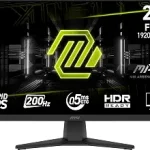
SAMSUNG 34″ ViewFinity S50GC Series Ultra-WQHD Monitor (ASIN B0C1KPXPM9)
Best Ultrawide Monitor Buying Guide — Black Friday Deals 2026
An ultrawide monitor can make sense when you want a broader desktop view, but the right choice depends on the shape and specifications you will actually use. This shortlist ranges from a 34-inch 21:9 display to a 49-inch 32:9 model, with different refresh rates, response times and viewing features. The Best Overall and Best Budget labels are editorial choices among these listed monitors, not test results or claims about the wider market. During Black Friday, compare the exact model and configuration shown in the listing with the features that matter to you. A sale label alone does not establish that an offer is worthwhile, and no current promotion is assumed here.
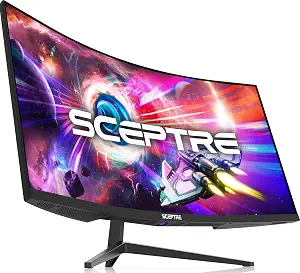
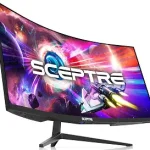
The Sceptre C345B-QUT168 is the Best Budget pick among these three products. That is an editorial label for this shortlist, not a statement about its current price or a guarantee that it is the least expensive offer. Its listed 34-inch curved screen has a 21:9 aspect ratio and 3440 x 1440 resolution. Those figures give shoppers a clear way to compare its format with the two Samsung options while deciding how much screen width and resolution they want for their desk.
The refresh rate is 165 hertz, and the response-time specification is 1ms MPRT. Keep the qualifier MPRT in mind when comparing response-time language across listings; specifications should be read as presented rather than treated as interchangeable measurements. For someone considering a monitor for gaming or other motion-focused use, these details are useful points to check against personal priorities and the demands of the intended setup. They do not, by themselves, establish how a particular game or computer will perform.
The listed connections are 2 x HDMI Port and 2 x DP Port. Before a Black Friday purchase, compare those exact connection names with the outputs and cabling you plan to use, and confirm the product page describes the C345B-QUT168. The provided facts do not specify cable inclusion or further connection capabilities, so those details should be verified directly if they affect your decision. This Sceptre may suit a shopper seeking a 34-inch 21:9 curved display with a high listed refresh rate and clearly stated ports. Balance those priorities with the screen size and resolution you actually want; a deal is relevant only if the exact model meets your needs.
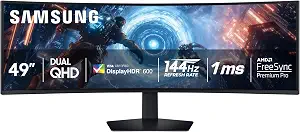
The Samsung Odyssey G9 G91F is the broadest-format option in this group: its 49-inch screen uses a 32:9 aspect ratio and 5120×1440 pixels. That combination may appeal if your plan calls for an especially wide viewing area rather than a more conventional 21:9 ultrawide. Think about the desk space and viewing arrangement you have before choosing a screen of this size. A larger format is useful only when it suits the way you intend to position and use the display.
This model is labeled Best Overall because it brings together a distinctive wide format, a 144 hertz refresh rate, a 1 milliseconds response time, and VESA DisplayHDR 600. These are separate specifications to weigh against your priorities; the label is not a claim that it outperforms every other monitor. Its title also identifies AMD FreeSync Premium Pro and an ergonomic stand. If those named features matter to your setup, check that the specific listing and model variant you are considering match the G91F details rather than relying on a general product-family name.
For a Black Friday comparison, note the exact resolution, aspect ratio, refresh rate and HDR designation alongside the offer. The listed ports are DisplayPort, HDMI and USB, so consider which connections your intended devices require and verify the listing details for the exact configuration. The product facts do not specify quantities or more detailed port versions, so do not assume those from the general port names. The combination of a 49-inch screen and a 32:9 format is the main decision point: choose it when that expansive layout is what you want, rather than treating the biggest screen as an automatic advantage.
Key specs
Screen size
49 inches
Aspect ratio
32:9
Resolution
5120×1440 pixels
Refresh rate
144 hertz
Response time
1 milliseconds
DisplayHDR
VESA DisplayHDR 600
Ports
DisplayPort, HDMI, USB
SAMSUNG 34″ ViewFinity S50GC Series Ultra-WQHD Monitor
SAMSUNG 34″ ViewFinity S50GC Series Ultra-WQHD Monitor (ASIN B0C1KPXPM9)
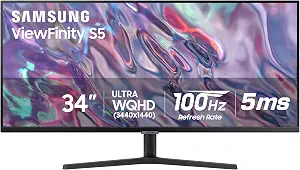
The Samsung ViewFinity S50GC is the Best for Multi-Source Viewing choice because its listed PBP feature can show input from 2 simultaneous sources at native resolution. That gives shoppers with two sources to display a specific feature to investigate, without assuming how a particular layout will look in every setup. The monitor’s 34-inch screen, 3440 x 1440 pixels and 21:9 aspect ratio provide the rest of the basic format information needed to compare it with the other models here.
Its refresh rate is 100 hertz and its response time is 5 milliseconds. These specifications may matter differently depending on whether your main concern is everyday desktop use, viewing multiple sources, or motion-focused activities. Consider them separately rather than assuming that the PBP feature answers every question about suitability. The screen finish is matte, and the listed picture-quality feature is HDR10. If those details are priorities, look for them on the exact product listing during a Black Friday comparison.
The S50GC also lists FreeSync as its adaptive-sync feature. Its combination of 21:9 format and PBP makes it a useful candidate to consider when a wide workspace and two-source viewing are both part of your plan. Before checkout, verify the precise model name and the PBP description, then consider how the stated resolution, refresh rate and response time fit your intended use. Black Friday pricing can draw attention to a listing, but the product’s supported features—not an assumed discount—should guide the choice. The facts supplied here do not establish details such as included cables or compatibility with a specific device, so confirm those needs on the listing.
Key specs
Screen size
34 inches
Resolution
3440 x 1440 pixels
Aspect ratio
21:9
Refresh rate
100 hertz
Response time
5 milliseconds
Screen finish
Matte
Picture quality
HDR10
Adaptive sync
FreeSync
Multi-source viewing
With PBP, view input from 2 simultaneous sources at native resolution
Choose the screen shape around your desk routine
Start by picturing the work or viewing arrangement you want, then compare the listed size and aspect ratio. The two 34-inch monitors here are 21:9 displays; one is the curved Sceptre C345B-QUT168, while the Samsung ViewFinity S50GC is also 34 inches and 21:9. The Odyssey G9 G91F steps into a different category of physical scale and shape with its 49-inch screen and 32:9 aspect ratio. These are not just labels to skim: they describe materially different formats, so consider your available desk area, seating position and the amount of horizontal space you expect to use.
A wide display may be attractive if you want room to arrange content side by side, but the best fit depends on your own habits and workspace. If you mostly want a 34-inch ultrawide, compare the Sceptre and ViewFinity on their other specifications. If the extra-wide 32:9 format is specifically what you are seeking, assess the G9 on that basis. During Black Friday, keep the model name beside the screen dimensions while reviewing offers. That small check helps prevent a similar-looking product-family listing from distracting you from the particular size and format you intended to buy.
Read motion figures in their stated context
Refresh rate and response time are separate specifications, and the figures here differ across the three models. The Sceptre lists 165 hertz and 1ms MPRT; the Odyssey G9 G91F lists 144 hertz and 1 milliseconds; the ViewFinity S50GC lists 100 hertz and 5 milliseconds. Use the exact model’s figures when comparing candidates, and retain any qualifier attached to a specification. In particular, the Sceptre’s MPRT wording should remain part of the comparison rather than being silently rewritten as a different response-time measure.
Your priorities determine how much weight to give these numbers. A shopper focused on motion-related specifications may want to examine refresh rate and response time closely, while another buyer may care more about screen format or multi-source viewing. The figures alone do not predict a personal experience or establish compatibility with a computer. Check the intended setup and the exact product listing before deciding. When Black Friday deals appear, compare the same specifications across the precise model variants under consideration instead of assuming that a larger discount makes one set of motion figures a better match.
Decide whether multiple inputs belong in your plan
If you expect to view more than one source on a single display, the ViewFinity S50GC has a specifically listed feature to investigate: PBP can show input from 2 simultaneous sources at native resolution. Consider whether that function fits your intended arrangement, and verify its description on the exact product page. The Sceptre’s facts list 2 x HDMI Port and 2 x DP Port, while the G9’s listed ports are DisplayPort, HDMI and USB. Port names help start a connection check, but the supplied information does not give every detail a device-specific setup might require.
Before a Black Friday purchase, write down the outputs on the devices you plan to connect and compare them with the monitor’s listed connections. Confirm any requirements that are important to you, including details not stated in these product facts. Do not assume that a port name guarantees a particular cable, port version or included accessory. Likewise, do not confuse having several listed connection types with the S50GC’s explicit PBP capability: the latter is the feature tied to simultaneous source viewing in this shortlist. Let your actual input plan determine which details to verify.
Give image features their own place in the comparison
Resolution, finish and HDR information can help distinguish monitors, but they describe different aspects of a product. The Sceptre and ViewFinity each list 3440 x 1440 resolution, while the Odyssey G9 G91F lists 5120×1440 pixels. The ViewFinity’s screen finish is matte and its picture-quality feature is HDR10. The G9 lists VESA DisplayHDR 600. These are the provided specifications; avoid assuming that one label alone answers every question about how images will appear in your particular room or with your content.
Consider which of these details matter for the way you use a screen, then verify them on the precise listing. If the HDR designation is important, compare the product’s stated label rather than relying on a broad description. If finish matters, the ViewFinity is the model here with a supplied matte-finish specification. During Black Friday, keep resolution and image-feature checks separate from offer comparisons. A promotion does not change the underlying specifications, and the product facts do not provide a basis for claims about brightness in other conditions, color performance or a viewing environment.
Use Black Friday listings to check the exact variant
A Black Friday offer is worth evaluating only after you know which monitor and configuration it refers to. Check the complete model name: C345B-QUT168 for the Sceptre, ViewFinity S50GC for the 34-inch Samsung, and G91F for the Odyssey G9. Then match the listing to the specifications that matter to you, such as screen size, resolution, aspect ratio, refresh rate, response-time wording, stated image features and connections. This comparison is more useful than relying on a headline that may omit details.
No active promotion or particular price is established here, so compare the live offer shown to you with other current options and your own budget. Confirm that the product page describes the model you intend to buy, and check any practical listing details you need before placing an order. Do not assume that a sale badge signals a specific discount or that a similar model has identical specifications. Keeping the product facts and your priorities together makes it easier to decide whether a Black Friday offer is genuinely relevant to your shortlist.
Make your Black Friday choice
The strongest choice in this group depends on the format and features you want: the Sceptre offers a 34-inch curved 21:9 display with 165 hertz, the ViewFinity pairs its 34-inch 21:9 format with PBP, and the Odyssey G9 G91F provides a 49-inch 32:9 screen with VESA DisplayHDR 600. Those distinctions support the Best Budget, Best for Multi-Source Viewing and Best Overall editorial labels, respectively, without making them universal winners. As Black Friday approaches, compare the exact model and offer, verify the details that matter to your setup, and choose on fit—not on a promotion label alone.