Western Digital 1TB My Passport SSD Portable External Solid State Drive, Gray (ASIN B08F27QGHX)
Best Western Digital Ssd Buying Guide — Black Friday Deals 2026
Choosing a Western Digital SSD starts with its destination: inside a compatible laptop or other device, or beside your computer as portable storage. The listed options cover an M.2 NVMe drive, a 2.5-inch SATA drive and an external portable SSD, so the right choice depends on the connection and format your setup can use. Black Friday can make comparing offers worthwhile, but a seasonal headline does not tell you whether the exact drive suits your needs. Check the listed model, capacity and form factor before weighing its features.
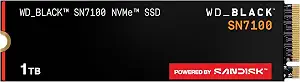
The WD_Black SN7100 is the Best Budget pick in this guide for shoppers looking at an internal M.2 NVMe option with a stated capacity of 1 TB. It uses a PCIe Gen4 NVMe interface and an M.2 2280 form factor. Those details make it important to check the intended device’s documentation and available drive slot before adding it to a Black Friday shortlist; a familiar brand name alone does not confirm that a particular device accepts this format.
Its listed maximum speeds are up to 7,250 MB/s read and up to 6,900 MB/s write, and its NAND is Next Gen TLC 3D NAND. Treat those figures as the manufacturer-listed maximums, not a promise of what every device or task will achieve. The intended devices named for the drive are laptops and handheld gaming devices. If your goal is internal storage for one of those categories, the stated audience gives you a useful starting point, while the precise model and requirements of your device remain worth checking.
For a Black Friday purchase, compare the exact SN7100 variant and the stated 1 TB capacity with the storage plan you have in mind. This Best Budget label is an editorial choice among the drives in this guide, not a claim that the drive is the least expensive offer or that a promotion is active. Consider whether you need an internal M.2 drive, whether your device supports PCIe Gen4 NVMe and M.2 2280, and whether the listed capacity fits your intended use. If those conditions line up, its stated speed figures and device focus help distinguish it from the SATA and portable options here.
Key specs
Capacity
1 TB
Interface
PCIe Gen4 NVMe
Form factor
M.2 2280
Read speed
Up to 7,250 MB/s Read Speed
Write speed
Up to 6,900 MB/s Write Speed
NAND
Next Gen TLC 3D NAND
Intended devices
for Laptops, Handheld Gaming Devices
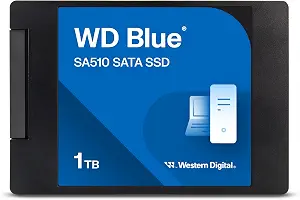
Western Digital 1TB WD Blue SA510 SATA Internal Solid State Drive SSD – SATA III 6 Gb/s, 2.5″/7mm, Up to 560 MB/s – WDS100T3B0A
Western Digital 1TB WD Blue SA510 SATA Internal Solid State Drive SSD – SATA III 6 Gb/s, 2.5″/7mm, Up to 560 MB/s – WDS100T3B0A (ASIN B09ZYQ84CM)
The WD Blue SA510 is the Best Overall choice in this guide for shoppers whose setup calls for an internal 2.5-inch SATA SSD. It has a 1 TB capacity, a SATA interface and a listed form factor of 2.5″. Its data transfer rate is 6 gigabits_per_second, and its read speed is up to 560 MB/s. Those specifications make the drive’s format and connection the first things to confirm: check the device’s requirements and available space before considering a Black Friday offer.
This model can make sense when you are replacing or adding internal storage in a system designed for a 2.5-inch SATA drive. That is a conditional use case, not a claim that it will fit every laptop or desktop. The provided details do not identify every device it works with, so verify the exact system requirements rather than relying on the words “internal SSD.” Its listed read speed provides a concrete specification to consider, but a maximum figure alone cannot predict how a particular workload will feel.
The Best Overall label is an editorial selection among these featured products, not a test result or a claim about every SSD on the market. At Black Friday, compare the exact WD Blue SA510 listing, its 1 TB capacity and its SATA 2.5-inch format. Those checks can help prevent a mismatch between the offer and the drive your system needs. The model is most relevant if you specifically want internal SATA storage; if you instead need an M.2 NVMe drive or a portable external option, the other products in this guide address different formats and purposes.
Key specs
Capacity
1 TB
Drive type
Internal
Interface
SATA
Form factor
2.5″
Data transfer rate
6 gigabits_per_second
Read speed
Up to 560 MB/s
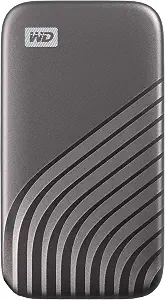
Western Digital 1TB My Passport SSD Portable External Solid State Drive, Gray
Western Digital 1TB My Passport SSD Portable External Solid State Drive, Gray (ASIN B08F27QGHX)
For file transfers away from a fixed internal drive, the 1 TB WD My Passport SSD is the Best for portable file transfers pick. It is described as a portable external SSD and comes in gray. Its listed read speed is 1050 megabytes_per_second, with write speeds of up to 1000MB/s. This makes it a relevant option to consider for keeping files in a portable drive, but choose it only after checking that its connections suit the systems you plan to use.
The listed connectivity is USB 3.2 Gen-2 and USB-C, with USB-A for older systems. The description also specifies password enabled 256-bit AES hardware encryption. For someone carrying files, that provides a stated security feature to weigh alongside connection needs; it does not remove the importance of choosing and managing a password. The drive is described as shock and vibration resistant and drop resistant up to 6.5ft (1.98m). These are specific listed protection details, not a reason to assume the device is indestructible or appropriate for every environment.
The Best for portable file transfers label reflects those listed external-drive and connection features, not a measured ranking. During Black Friday, inspect the exact My Passport SSD variant and confirm its 1 TB capacity, color and included connectivity details on the offer you are considering. Think about where you will connect it, which port is available and whether hardware encryption is useful for your files. This model serves a different role from an internal SATA or M.2 drive: it is the portable external choice in this group, so the deciding question is whether external access fits the way you store and move data.
Key specs
Storage capacity
Digital Storage Capacity 1 TB
Read speed
Read Speed 1050 megabytes_per_second
Write speed
write speeds of up to 1000MB/s
Encryption
Password enabled 256-bit AES hardware encryption
Impact resistance
Shock and vibration resistant.
Drop resistance
Drop resistant up to 6.5ft (1.98m)
Connectivity
USB 3.2 Gen-2 and USB-C (USB-A for older systems)
Decide where the drive will live
First, decide whether you need storage installed inside a device or a drive you can connect externally. That choice narrows the options more effectively than starting with a speed figure. The WD Blue SA510 is an internal SATA drive in a 2.5″ form factor. The WD_Black SN7100 is an internal M.2 2280 drive using PCIe Gen4 NVMe. The My Passport SSD is described as a portable external drive with USB connectivity. These are different arrangements, and the right one depends on what your setup can accept and how you plan to use the storage.
Before Black Friday, check the device documentation for the required drive type, physical format and interface. Avoid assuming that a drive fits because the capacity looks right or because a retailer groups several products under one search. If you want to move files between systems, consider the portable model’s listed USB 3.2 Gen-2 and USB-C connectivity, including USB-A for older systems, and confirm the connection available on the devices you have in mind. For an internal replacement, verify the specific system’s requirements rather than guessing from the product category.
Use capacity as a planning decision
Each featured drive is listed with 1 TB of storage, so capacity does not distinguish these options in the provided specifications. Instead, estimate what you want the new drive to hold and whether it belongs inside a device or should remain portable. A library of files kept near a computer may call for a different arrangement from storage you want to carry between locations. Naming the job first helps avoid choosing a format that does not match your routine.
A Black Friday listing can display multiple capacities or product variants near one another, so confirm that the selected offer is for the stated 1 TB model. Read the complete product name and check the format as well as capacity: internal SATA, internal M.2 NVMe and portable external describe distinct products here. Do not treat a seasonal label as proof that the selected version matches the one you intended. If your storage needs are not clear yet, list the files or tasks you want to accommodate before comparing offers.
Read speed figures as stated specifications
The products list different kinds of speed details, and each figure should be read with its own qualification. The WD_Black SN7100 lists up to 7,250 MB/s read and up to 6,900 MB/s write. The WD Blue SA510 lists up to 560 MB/s read and a SATA data transfer rate of 6 gigabits_per_second. The My Passport SSD lists read speed of 1050 megabytes_per_second and write speeds of up to 1000MB/s. These are product specifications, not guarantees for every device or task.
Ask what you do often: launch and save files on an internal drive, or transfer files using an external one? Then check that the interface and form factor fit the intended setup. For a Black Friday comparison, keep the units and wording intact instead of treating every number as directly interchangeable. A maximum speed claim does not, on its own, establish how the drive will perform in your particular system. Prioritize a confirmed fit and the feature you need before letting a headline speed decide.
Choose between internal storage and carry-along use
Portability is a practical distinction in this group. The My Passport SSD is the listed external option, with USB 3.2 Gen-2 and USB-C connectivity and USB-A for older systems. Its portability, stated transfer speeds and listed protection features may be relevant if you regularly move files. The two other drives are described as internal: the WD Blue SA510 uses SATA and a 2.5″ form factor, while the WD_Black SN7100 uses PCIe Gen4 NVMe and M.2 2280.
Consider where the drive will spend most of its time, how you will connect it and whether it needs to move between systems. The portable drive’s shock and vibration resistance and drop resistance up to 6.5ft (1.98m) are specific listed features; do not extend them into assumptions about every type of damage. Its password enabled 256-bit AES hardware encryption is a separate consideration from physical protection. During Black Friday, compare these details against your real use rather than treating portability, protection and security as interchangeable benefits.
Make the Black Friday offer match the intended model
Once you know your preferred format, verify the exact product name and variant on the offer page. Check that a WD_Black SN7100 is the M.2 2280, PCIe Gen4 NVMe version described here, that a WD Blue SA510 is the internal SATA 2.5″ drive, or that a My Passport SSD listing is the portable external product with the connectivity you expect. Confirm the stated 1 TB capacity instead of relying on a broad category label or an image alone.
A Black Friday headline does not establish that a promotion is active, that a particular variant is included or that a deal suits your setup. Compare the offer details you can actually see: exact model, capacity, interface, form factor and the features relevant to your plans. If any key detail is unclear, pause and verify it before purchasing. That careful check is especially useful when products share a brand but serve different roles. Make the decision on fit and requirements first, then consider the current offer on its own terms.
Make your Black Friday choice
The best Western Digital SSD for you depends on the job and the connection your device supports: choose between internal SATA, internal M.2 NVMe and portable external storage before comparing other details. Use the stated capacity, interface and features to narrow the shortlist, then confirm the exact variant. Black Friday is a useful moment to review offers, not a substitute for checking compatibility or the product description. A deliberate match is more valuable than a seasonal headline.