Best Ssd Hard Drive Buying Guide — Black Friday Deals 2026
Choosing an SSD is easier when the drive’s role is clear before Black Friday listings start competing for attention. A portable USB drive, an internal SATA replacement and an M.2 drive serve different setup plans, even when each listing shows the same capacity. This guide compares three Samsung options through the everyday decisions that shape a useful shortlist: where the drive will sit, which connection your device accepts, and what you expect it to store or do. The Best Overall, Best Budget and Best for 2.5-inch SATA upgrades labels are editorial distinctions within these options, not claims about market-wide winners. Treat any Black Friday offer as specific to the exact model and variant shown.
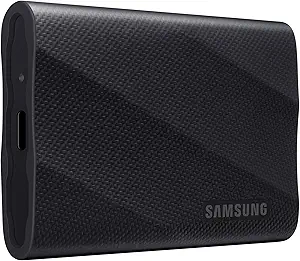
For a workflow that may move between locations, the Samsung T9 Portable SSD 2TB is the most straightforward fit among these choices. It has 2 TB of digital storage capacity and a USB 3.2 Gen 2×2 interface, so the first practical question is whether the device you plan to connect accepts the required connection. Its listed speed is up to 2,000MB/s; that is a qualified maximum, not a promise that every transfer or connected setup will reach it. As an editorial choice, Best Overall recognizes the T9’s combination of a portable-drive role, stated capacity and listed connection, rather than claiming measured superiority.
Consider a planned day of moving video files from a compatible setup, keeping a working collection available, or carrying storage between places. The listing specifically says it supports iPhone 15 Pro Res 4K at 60fps video, which makes that named recording use relevant when deciding whether this model belongs on your shortlist. Do not generalize that statement to other phones or recording modes. The drive also lists hardware encryption. That feature may matter if you want the stated protection feature in your selection criteria; check the exact product details and your own device setup before assuming how it fits your workflow.
The listed dimensions are 3.46″L x 2.36″W x 0.55″Th, and its weight is 122 g. Those details help you judge whether the physical drive suits the place you intend to keep it, without needing to guess from the word portable alone. For Black Friday, compare the exact T9 model, capacity and interface shown in the offer rather than choosing from a banner or product-family name. Check that the listing describes the same 2TB version and that your intended device can use its connection. The Best Overall label is a guide to this product’s role in this selection; your own connection and carrying needs should decide whether it is right for you.
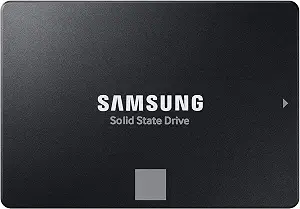
Samsung SSD 870 EVO SATA III 2.5” 2TB (ASIN B08QB93S6R)
For replacing or adding storage in a system designed for a 2.5-inch SATA drive, consider the Samsung SSD 870 EVO SATA III 2.5” 2TB. It has 2 TB capacity, a Serial ATA interface and a 2.5 inches form factor. Those details make it the clearest match in this selection for a buyer whose upgrade plan specifically calls for that drive type. Before shopping, confirm that the intended laptop, Mac or PC takes the listed format and connection; those are the compatible device categories named for this model, not a guarantee for every individual system.
The listing gives sequential read speed up to 560 MB/s and sequential write speed up to 530 MB/s. Keep the “up to” qualification in mind and consider whether those listed figures suit the way you expect to use the drive. For example, someone planning a straightforward internal SATA upgrade can start by confirming the system’s drive bay and connection, then use the speed information as a further comparison point. This is a different installation path from choosing a portable USB drive or an M.2 model, so the right first question is whether SATA and the 2.5-inch format fit the planned job.
Best for 2.5-inch SATA upgrades is the editorial label assigned here because the model’s stated form factor and Serial ATA interface directly fit that category of upgrade decision. It is not a claim that the drive is the best choice for every laptop, Mac or PC. During Black Friday, compare the exact 2TB SATA III 2.5-inch listing with the drive your system requires. Check the model and capacity rather than relying on a general family name, and do not assume an offer for another configuration has identical details. If the installation plan calls for a different connection, one of the other products may be more relevant.
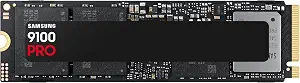
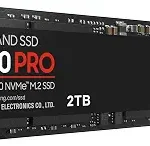
The Samsung SSD 9100 PRO 2TB is an internal M.2 option for a setup built around a PCIe 5.0×4 M.2 2280 interface. Its 2 TB capacity may suit someone planning a substantial internal storage role, but the connection and installation format should come first in the decision: confirm that your desktop or laptop supports the listed interface and form factor before comparing offers. The product listing also identifies PS5 compatibility with added Heatsink device. Keep that qualification attached to the compatibility statement; it is not an unconditional promise for every console arrangement.
The stated sequential speeds are up to 14,700/13,400 MB/s read/write. These are listed maximum sequential figures, so use them as one point of reference rather than assuming every task or system will produce those results. If your planned use involves large files, speed claims may be worth considering, but compatibility and the particular task still matter. The drive also includes hardware encryption and continual monitoring of drive health via Magician Software. Those are concrete listed features to weigh if encryption and monitoring belong on your requirements list; their presence does not remove the need to check your own setup.
This guide assigns the 9100 PRO the Best Budget label as an editorial choice among the three featured products. That label does not state that it has the lowest price, nor does it imply a measured performance or value ranking. For Black Friday, assess the exact 2TB model and configuration on offer, and compare the stated interface, sequential speed qualifications and any included setup details. If the listing is for a different capacity or variant, do not assume its details match this one. Choose this SSD when the listed M.2 connection fits the intended installation and its features answer your needs, not simply because a sale banner uses a broad product-family name.
Key specs
Capacity
Digital Storage Capacity 2 TB
Interface
PCIe 5.0×4 M.2 2280
Sequential speeds
up to 14,700/13,400 MB/s¹ sequential read/write speeds.
Compatible devices
Desktop, Laptop, PS5 with added Heatsink device²
Drive health monitoring
Continual monitoring of your drive health via Magician Software
Encryption
Hardware Encryption
Plan the drive’s place in your setup
Start by picturing where the storage will be used, not by sorting products according to a Black Friday headline. A drive that travels between locations has a different role from an internal upgrade that stays in a computer. The T9 is identified as a portable SSD, and its dimensions and weight are listed; those details help you consider its physical fit in your routine. The 870 EVO is a 2.5-inch Serial ATA model, while the 9100 PRO uses a PCIe 5.0×4 M.2 2280 interface. Their different formats point to different installation plans, so identifying the intended location can narrow the options before you compare offers.
Write down the device and the job you have in mind: carrying files, adding internal capacity, or replacing a particular kind of drive. Then check the matching product facts against that plan. The T9’s listed USB interface belongs in a different connection check from the SATA connection of the 870 EVO or the M.2 interface of the 9100 PRO. Do not treat the products as interchangeable just because each is an SSD. On Black Friday, a listing may draw attention to the product family or the capacity, but your shortlist should remain tied to the exact model and installation role you actually need.
Let the connection decide the shortlist
Compatibility is a practical filter, not a detail to postpone until checkout. For the T9, verify that the intended device can use USB 3.2 Gen 2×2. For the 870 EVO, check that the planned system accepts a 2.5-inch Serial ATA drive. For the 9100 PRO, confirm support for PCIe 5.0×4 M.2 2280. These are distinct specifications, and a familiar device name alone may not establish that a particular configuration fits. The listed compatible devices for the 870 EVO are laptop, Mac and PC; the 9100 PRO lists desktop, laptop and PS5 with added Heatsink device.
Use those statements carefully: they describe the listed compatibility, but they do not answer every model-specific installation question. In particular, keep the added-heatsink qualification attached when considering the 9100 PRO for PS5. If you are comparing Black Friday offers, check that the product page identifies the same model and configuration you meant to buy. A promotional description can make a drive look broadly suitable, while the interface determines whether it can serve the intended connection. When uncertain, pause to confirm the device’s requirements instead of treating a sale label as compatibility guidance.
Match capacity to the files you expect to keep
Each featured product is listed with 2 TB capacity, so capacity alone does not distinguish these three options. The better question is how you expect to use that space and where you want it available. A person organizing a mobile work collection may value the T9’s portable-drive role, while someone replacing an existing SATA drive may be focused on the 870 EVO’s form factor. A planned M.2 installation points toward the 9100 PRO if the system supports its connection. These are use-case distinctions, not claims that one model stores more than another.
Before looking at Black Friday offers, make a simple list of what the drive is meant to hold: working files, a collection you want to carry, or data assigned to an internal upgrade. Consider whether the files need to move with you or stay in a particular device. Then use the stated capacity as one part of the decision, alongside the connection and installation plan. Avoid assuming that capacity makes a drive suitable for a system that cannot accept its interface. If the listing’s capacity differs from the 2TB version described here, revisit the details rather than carrying these product facts over to another variant.
Read speed figures with the task in mind
Speed figures can be useful, but they answer only part of a buying question. The T9 lists speed up to 2,000MB/s. The 870 EVO lists sequential read speed up to 560 MB/s and sequential write speed up to 530 MB/s. The 9100 PRO lists up to 14,700/13,400 MB/s sequential read/write speeds. Their wording and measurement descriptions matter: “up to” figures and sequential claims are not guarantees for every file, device or task. Keep each figure with its own model and qualification when comparing options.
Think about the work you actually plan to do before deciding how much weight to give those numbers. If the listed feature matters to a particular workflow, confirm that the rest of the setup supports the drive and that the figure is relevant to the task. The T9’s listing specifically mentions support for iPhone 15 Pro Res 4K at 60fps video; do not extend that statement to other devices or modes. During Black Friday, avoid treating a headline speed as a complete account of real-world performance. Use the provided figures as specifications for comparing the exact product, not as a promise about every use.
Compare the exact Black Friday listing
A Black Friday promotion is not a reason to assume that every listing under a product family has the same configuration. Check the model name, capacity, interface and form factor on the exact offer you are considering. For the T9, confirm the 2TB version and USB 3.2 Gen 2×2 interface. For the 870 EVO, check for the 2TB 2.5-inch SATA III version. For the 9100 PRO, verify the 2TB PCIe 5.0×4 M.2 2280 listing and retain the stated compatibility qualifications. Do not infer a price, discount or included item from the product names alone.
Compare the details that matter to your plan rather than relying on a banner or a broad deal label. If the offer describes a different capacity or variant, assess that item’s own information instead of assuming it matches the product discussed here. Consider whether listed features such as hardware encryption on the T9 and 9100 PRO, or drive health monitoring via Magician Software on the 9100 PRO, are relevant to you. Black Friday can be a useful moment to review options, but the exact configuration and fit should remain the basis for a decision. If the listing does not make those details clear, do not treat the label as a substitute for checking them.
Make your Black Friday choice
A sound SSD choice begins with the role the drive must fill: portable storage, a 2.5-inch SATA upgrade, or an M.2 installation. From there, verify the connection, consider capacity and task-relevant specifications, and keep every compatibility statement within its stated limits. The editorial labels help organize these three options, but they do not replace that fit check. As Black Friday offers appear, compare the exact model and variant rather than assuming a banner tells the whole story. Choose the drive that matches your device and planned use; if those details do not line up, wait for a listing that does.